Federal Scholarship Tax Credit: The Questions Schools and SGOs Are Asking Right Now
Since the Federal Scholarship Tax Credit (FSTC) was enacted, conversations shifted quickly from understanding the legislation to planning for implementation.
The FSTC depends on coordination across an entire ecosystem. Donors, Scholarship Granting Organizations (SGOs), schools, dioceses, and community partners each play a role in helping families access scholarships.
SGOs often lead donor engagement and scholarship administration. Schools help families understand opportunities and navigate application processes. Dioceses and networks may coordinate communication across communities.
Building that shared understanding early can help ensure the program functions smoothly once scholarships begin flowing.
FACTS recently hosted two webinars that covered the FSTC basics and explored this ecosystem in more detail. In these conversations, leaders from across the country raised practical questions about how the program functions, how it interacts with existing scholarship programs, and what preparation should look like as federal guidance develops.
Let’s dive into six common questions that schools and SGOs are asking about the FSTC right now.
1) How does the Federal Scholarship Tax Credit (FSTC) work?
The FSTC program creates a federal income tax credit for individuals who donate to approved SGOs.
That distinction matters because a tax credit reduces a donor’s tax liability directly, unlike a charitable deduction that only reduces taxable income.
Another aspect of the program that often causes confusion is the $1,700 amount frequently referenced in discussions about the FSTC.
That figure applies to the tax credit available to donors, not the scholarship amount awarded to students. SGOs collect contributions from multiple donors and distribute those funds as scholarships, meaning the awards themselves may be significantly larger.
Under the current structure, individual donors may claim up to $1,700 per taxpayer per year for qualified contributions.
2) Can federal scholarships work alongside existing state programs?
Many schools participating in state scholarship programs are naturally asking how the FSTC may interact with those existing initiatives.
In general, the programs can operate alongside one another. However, the law includes provisions intended to prevent donors from receiving multiple tax benefits for the same contribution.
If a donor receives a state tax credit for a donation, the federal credit may be reduced accordingly.
Additional guidance from the U.S. Treasury is expected to further clarify how federal and state credits interact in practice.
3) What happens if my state doesn’t participate in the FSTC?
Community members located in states that aren’t initially participating in the program may wonder what the FSTC means for them.
Donors may contribute to an SGO located in another participating state. However, the law requires that those contributions support scholarships for students within the state where the SGO operates.
Because of this structure, state-level FSTC participation decisions will play an important role in determining where scholarships are available.
4) What is the role of Scholarship Granting Organizations (SGOs)?
The FSTC relies on SGOs to administer scholarships locally.
Participating organizations must meet several requirements, including operating as a 501(c)(3) nonprofit, verifying family income for scholarship recipients, and distributing at least 90% of funds as scholarships.
In practice, SGOs serve as the operational backbone of the program. Their responsibilities often include:
- Managing donor contributions: SGOs receive and track donations from individuals or organizations participating in the tax credit program.
- Verifying student eligibility: SGOs review income documentation and confirm that students meet program guidelines.
- Awarding scholarships: SGOs determine scholarship amounts and coordinate with schools to ensure funds are applied to qualifying expenses.
- Maintaining compliance: SGOs must track donations, scholarship awards, and program outcomes to meet federal requirements.
Because SGOs operate at the intersection of donors, families, and schools, they often manage a high level of coordination. As conversations around the FSTC evolve, many organizations are beginning to evaluate the systems and processes needed to manage these responsibilities at scale.
5) Where do schools fit into the FSTC program?
Schools do not administer the tax credit, but they play an important role in how families access scholarships.
While SGOs manage donations and award scholarships, schools often serve as a key point of guidance for families navigating the process. Families frequently turn to school administrators, financial aid offices, or admissions teams to better understand available scholarship opportunities and how they can apply.
Schools may support families by:
- Sharing information about available scholarships. Schools can help families understand eligibility requirements, application timelines, and where to apply.
- Helping families navigate the application process. While schools do not approve scholarships, they may answer questions and direct families to the appropriate SGO resources.
Once scholarships are awarded, schools also coordinate with SGOs to ensure the correct application of funds. This may include:
- Aligning tuition billing schedules with scholarship disbursements
- Adjusting financial aid packages when scholarship funds are received
- Applying funds directly to a student’s tuition or qualifying expenses
6) What should organizations do right now to prepare for the FSTC?
The legislation establishes the program framework, but several operational details will be clarified through federal rulemaking and state participation decisions.
For now, focus on preparation rather than immediate operational changes. That preparation may include reviewing eligibility verification processes, strengthening donor and reporting systems, and monitoring developments as federal guidance emerges.
Explore More FSTC Resources
The FSTC introduces a new opportunity for families, donors, and SGOs. As federal rulemaking progresses and states consider participation, additional details about implementation will continue to emerge.
FACTS works with organizations navigating these questions and preparing for scholarship program administration. As guidance develops, we will continue sharing insights and resources to help schools and SGOs stay informed. Here are a few already available resources to explore:
- School Choice Resource Hub: A collection of program details, webinars, and insights to help schools and SGOs understand and prepare for evolving scholarship programs
- FSTC Preparation Guide: A resource that covers the basics of the FSTC and tips for strengthening school and SGO partnerships, building donor readiness, preparing internal systems, and more
At FACTS, we’re always looking for new ways to innovate and build tools that help schools work smarter…which is why we’re so excited to announce the launch of SIS Dashboard Builder, a new reporting and visualization feature inside FACTS SIS!
SIS Dashboard Builder turns the data your school already trusts into clear, visual dashboards and customizable reports, making it easier to see trends, track key metrics, and understand what’s happening across your school.
Keep reading to learn everything you need to know.
What Is SIS Dashboard Builder?
Dashboard Builder is a new reporting tool within FACTS SIS that allows schools to view pre-built dashboards or create their own custom reports using PowerBI visualizations.
Instead of manually exporting data or piecing together reports, Dashboard Builder brings key information together in easy-to-understand visual views.
With Dashboard Builder, schools can:
- View important student, academic, and operational metrics in visual dashboards
- Combine data from multiple SIS sources into one report
- Customize dashboards based on roles, goals, or areas of focus
- Filter reports by school year or other criteria
- Export dashboards to Excel or PDF for deeper analysis or sharing
Most importantly, no additional data entry is required. Dashboard Builder simply helps schools get more value from the data they already maintain.
Start with Pre-Built Dashboards
To make getting started simple, Dashboard Builder includes several pre-built dashboards designed around common school reporting needs.
These dashboards help schools immediately begin exploring trends and insights without building reports from scratch.
Available dashboards include:
- Admissions & Reenrollment Analysis – Track enrollment trends and admissions activity
- At Risk – Identify students who may need additional support
- Behavior – Monitor behavioral trends and incident patterns
- Demographics – View key student population insights
- Medical – Assess important health-related student information
- Report Card – Analyze academic performance data
- Student Information – See a comprehensive view of student demographics, enrollment status, and family contacts
Build Custom Reports That Fit Your School
While the pre-built dashboards are a great place to start, one of our favorite parts of SIS Dashboard Builder is the ability to create custom reports and dashboards, giving schools the flexibility to build reports that reflect what matters most to them.
Using a drag-and-drop interface and PowerBI visualizations, users can combine fields from multiple SIS datasets to create reports that highlight the metrics that matter most to their team.
For example, schools might create reports that:
- Track enrollment trends by grade level or program
- Monitor attendance or behavioral patterns over time
- Analyze academic performance across classes or departments
- Review demographic trends across student populations
Because reports can be customized and filtered, administrators can quickly adapt dashboards for different needs throughout the school year.
Turn Data Into Actionable Insights
The goal of Dashboard Builder isn’t just to display data. It’s to make it easier for school leaders to see trends, ask better questions, and take action.
With clear visual dashboards, teams can more easily:
- Identify patterns affecting student success
- Monitor enrollment and retention trends
- Align leadership teams around shared metrics
- Share insights across departments
Instead of sorting through spreadsheets, schools can quickly access the information they need to guide conversations and decisions.
How Is SIS Dashboard Builder Different from Data Insights?
If you’re already familiar with FACTS Data Insights, you might be wondering how SIS Dashboard Builder fits in. Both tools help schools better understand their data, but they serve slightly different purposes.
Dashboard Builder lives directly inside FACTS SIS and focuses on helping schools visualize and report on the data already stored within their SIS. It’s ideal for quickly building reports, tracking trends, and creating dashboards around student, academic, and operational metrics.
Data Insights, on the other hand, provides deeper aggregated analytics across multiple FACTS systems, helping schools analyze trends across financial, enrollment, and operational data at a broader level.
In short:
- Dashboard Builder helps teachers and school staff visualize and report on SIS Data
- Data Insights helps principals and district leaders analyze trends across multiple FACTS platforms
Ready to learn more? Watch this short on-demand webinar to see Dashboard Builder in action.
We’re introducing this tool in a phased approach, so keep an out on your inbox to learn when this powerful tool will be enabled for your school!
This post is part of our series “An Educator’s Guide to AI,” written by FACTS team member and educator Kevin Donohue. Stay tuned for more posts from Kevin!
In November of 2022, ChatGPT released GPT-3.5, or the text-davinci-002 model, to the public, kickstarting the generative AI boom, which has impacted education, business, and society. Since then, Google, Microsoft, Anthropic, and many other companies have jumped in with their own generative AI models, promoting them as AI assistants capable of generating text, images, and videos in response to prompts or embedded in outside tools.
As with many fields, those of us in education had the opportunity to jump in with the public, and so did our students. Some teachers were quick to do so and students were even quicker. The rash of GPT-generated homework, essays, and work has caused widespread concerns about cognitive offloading, plagiarism, and the impact on learning.
Like most educators, I came to AI later. My first efforts at exploring generative AI happened fifteen months after GPT-3.5 became available.
As generative AI exits the terrible twos and fully moves into toddlerdom, I wanted to share some advice from my own successes and failures, along with insights from the many educators I’ve worked with in and outside of FACTS. Like a cool pool, I don’t recommend a cannonball in the deep end, but a gradual acclimation and accommodation as you move down the stairs. Let’s put on our AI suits, grab a prompting towel, and get ready to hit the pool.
Step 1: Get Settled
First, let’s learn a little bit about AI. Just as you would scope out the pool area for the best place to safely leave your belongings, we want to make sure we are ready for AI.
To start, check out our blog series on AI for educators:
Here are a few other great introductory resources to explore:
-
Explore a variety of other AI courses for beginners and more experienced users on Coursera
Make sure you understand how companies use and store your data, and what you want to expose and what you don’t. OpenAI and Claude require you to opt out of having your data used for training. Gemini’s education-based access says they will not use your data for training purposes. At the same time, like anything on the internet, whatever you type in is now out there somewhere on a server. So please put on your data sunblock!
Step 2: Test the Waters
After you get a sense of AI and how to be safe, it’s time to dip your toes in the water and start using it. Always start small: one or two tasks per week to get a sense of what AI can do practically for you.
A great starting step is to use its text-generative capabilities to assist in professionalizing emails. Use a basic prompt like, “You are an assistant to a school leader. Help me professionally answer this parent email in less than five sentences.” Be sure to review the generated text, tweak it to match your language and style, and avoid copying introductory text such as, “Sure, here’s a professional email.”
Another basic AI step is to have it be a research assistant. AI with web search capabilities can add relevant holidays and local events to your newsletter. With a simple weekly prompt, you can make your newsletter a strong touch point for families. Search can also analyze your school’s website or social media.
Step 3: Dive Deeper
After getting comfortable in the water of AI, it’s time to have fun and try some more advanced tasks. I usually recommend working with AI as a planning partner to assist with faculty meeting development or demographic analysis. Continue to be mindful of the data you are supplying and be sure to avoid your own cognitive offloading! Don’t drown in the pool of AI just because you’re comfortable.
The deeper end might include exploring further use of AI tools that can generate images and video or establishing a chatbot for your website. Consider how AI can collaboratively strengthen your team’s voice, smoothing rough edges and building a consistent message.
With practice at prompting and a commitment to learning, you can improve your workflows, communication, and productivity with ethical, efficient, and effective AI use.
I encourage you to be smart and spend some time with your new “pool noodle” of AI and ride in the lazy river of generative large language learning models. You’ll be making waves in no time. (Note: all these puns in the last paragraph are courtesy of ChatGPT-5).
About the Author
Kevin Donohue is the Leadership Coaching Manager for FACTS, where he also delivers customizable professional development and coaching in artificial intelligence for every group of stakeholders at a school. A Tampa native, Kevin joined FACTS after thirteen years teaching and leading in Catholic schools in Los Angeles, San Diego, and Boston. He lives in Arkansas with his wife, a professor of philosophy, and four children. This piece was written by him but checked by ChatGPT and the amazing humans at FACTS.
Simplify Childcare Compliance With Smarter Attendance Tracking
In the daily rhythm of a childcare center, attendance tracking might seem like a routine task—just another box to check between diaper changes and snack time. But for administrators, teachers, and families, it’s much more than that. It’s the foundation of compliance, safety, and trust.
Why Attendance Tracking Matters
Whether you’re a preschool director preparing for a licensing audit or a teacher managing ratios during nap time, attendance records are essential.
Attendance records help ensure:
- Compliance with state licensing regulations.
- Verification for subsidized care programs.
- Accurate child-staff ratios.
- Safe pickup and drop-off procedures.
- Reliable reporting for audits and inspections.
These aren’t just best practices—they’re requirements. And without the right tools, they can be time-consuming and stressful.
The Compliance Ripple Effect
Attendance tracking doesn’t just keep your center compliant—it keeps everything running smoothly. With accurate data, you can:
- Forecast staffing needs.
- Plan enrollment and capacity.
- Communicate clearly with families.
- Reduce administrative burden.
It’s the kind of operational efficiency that directors crave and teachers appreciate.
Frequently Asked Questions About Childcare Attendance Tracking
The best approach for tracking childcare attendance combines digital check-in tools with a centralized dashboard that updates in real time. Paper sign-in sheets create risk. They're easy to lose, hard to audit, and prone to errors. A digital system should capture timestamps automatically, log authorized pickups, flag ratio issues, and be accessible to both teachers and directors without extra steps. The key is that attendance happens as part of the natural drop-off workflow, not as a separate administrative task.
Childcare compliance requirements vary by state, but most licensing agencies require daily attendance logs for every enrolled child that include: date and arrival/departure times, name of authorized pickup, and staff-to-child ratio documentation. Centers participating in subsidy programs (like CCDF) typically face additional documentation requirements to support reimbursement claims. Missing or incomplete records are one of the most common reasons centers receive citations during inspections, even when their actual care practices are strong.
Digital tracking helps in three concrete ways. First, it eliminates manual errors. Timestamps can be recorded automatically rather than handwritten after the fact. Second, it makes audit preparation nearly effortless. Records are centralized and exportable rather than spread across paper binders. Third, it creates a real-time safety net. Directors can see when ratios are off rather than discovering the issue after the fact.
Did You Know?
Many states require childcare centers to maintain daily attendance logs for every child, including timestamps and authorized pickup details. Missing or inaccurate records can result in fines—or even loss of licensure.
How FACTS Childcare Management Simplifies Compliance
FACTS Childcare Management makes attendance tracking effortless—and audit-ready. It’s a natural extension of the FACTS SIS ecosystem, meaning it eliminates duplicate entry, disconnected apps, and extra logins.
Here’s how it helps:
| Requirement | How FACTS Childcare Management Helps |
|---|---|
| Daily attendance logs | Real-time tracking via teacher dashboard |
| Audit-ready reporting | Centralized, exportable logs for inspections |
| Pickup/drop-off verification | Secure parent messaging and digital check-in tools |
| Staff-child ratio monitoring | Automated alerts and ratio tracking |
| Subsidy program documentation | Integrated attendance records for reimbursement |
| SIS integration | One source of truth—no duplicate data entry |
| Parent engagement | Daily reports and secure messaging in one app |
Built for Directors, Teachers, and Families
FACTS Childcare Management was designed with every stakeholder in mind:
- Directors get centralized oversight and reporting.
- Teachers get simple tools that don’t disrupt their day.
- Families get transparency and peace of mind.
And because it’s integrated with FACTS SIS, it’s already part of the ecosystem your school trusts.
Ready to Simplify Compliance?
FACTS SIS schools are invited to join our program and help shape the future of childcare management.
- Flat monthly pricing
- No per-student fees
- Built for FACTS SIS users
Learn more and sign up today at FACTSmgt.com/childcare-early-access/. Because when it’s easy for directors and teachers to maintain compliance, they can focus on what matters most—and families feel more informed, connected, and confident.
When we officially launched FACTS Data Insights last October, we mentioned that it was only the beginning…and now we’re releasing three more powerful dashboards!
Available on March 2, Phase 2 of Data Insights includes new dashboards designed to help schools proactively manage cash flow, evaluate financial aid effectiveness, and monitor enrollment health across the student/family journey.
Let’s take a closer look at these new dashboards and what they can help your school discover.
**Not sure what we’re talking about? Don’t worry. Check out our Data Insights FAQ blog for a refresher on what it is, who can use it, and more.
Delinquency Management
At a glance: Look beyond basic balances to understand what’s driving delinquency and view historical trends
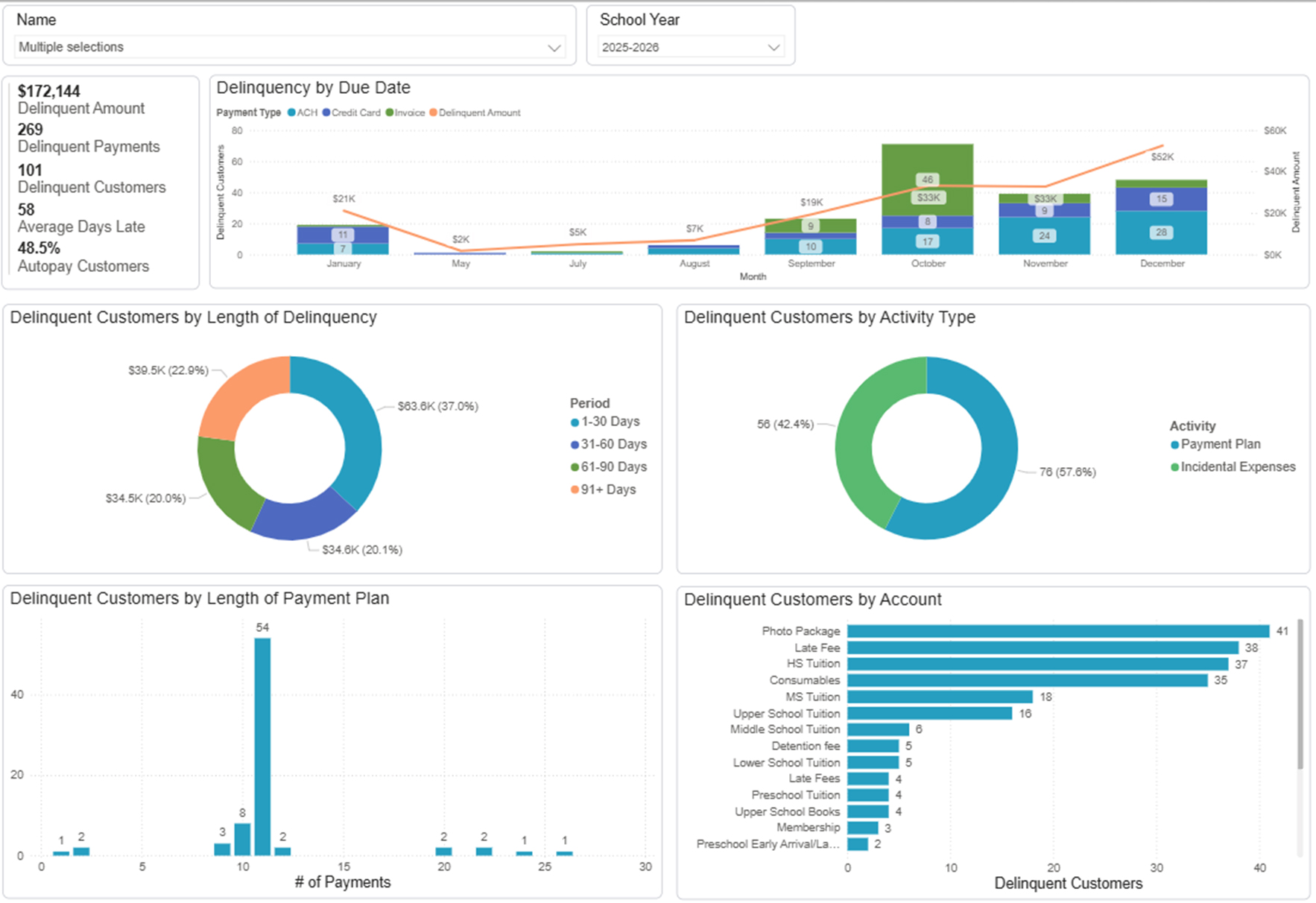
The Delinquency Management Dashboards help you understand underlying trends that may be driving account delinquencies. By combining financial and demographic data, you can uncover trends to support more proactive collections planning.
Instead of pulling separate reports from multiple systems, leaders can now:
- View historical delinquency trends year over year
- Identify patterns by demographic data, time period, payment method, and more.
- Explore interactive dashboard filters
In Action
Your finance team notices an increase in past-due balances mid-semester. By using the Delinquency Management Dashboards, you can determine whether the trend is tied to a specific type of bill, payment plan length, certain demographic data, autopay enrollment, and more, and adjust communication, policies, or payment structures proactively.
The goal is not just reporting what happened. It’s seeing patterns early enough to respond and make changes.
Financial Aid Effectiveness
At a glance: Explore how tuition, needs, income, demographic data, and awards work together to measure the impact of your financial aid strategy.
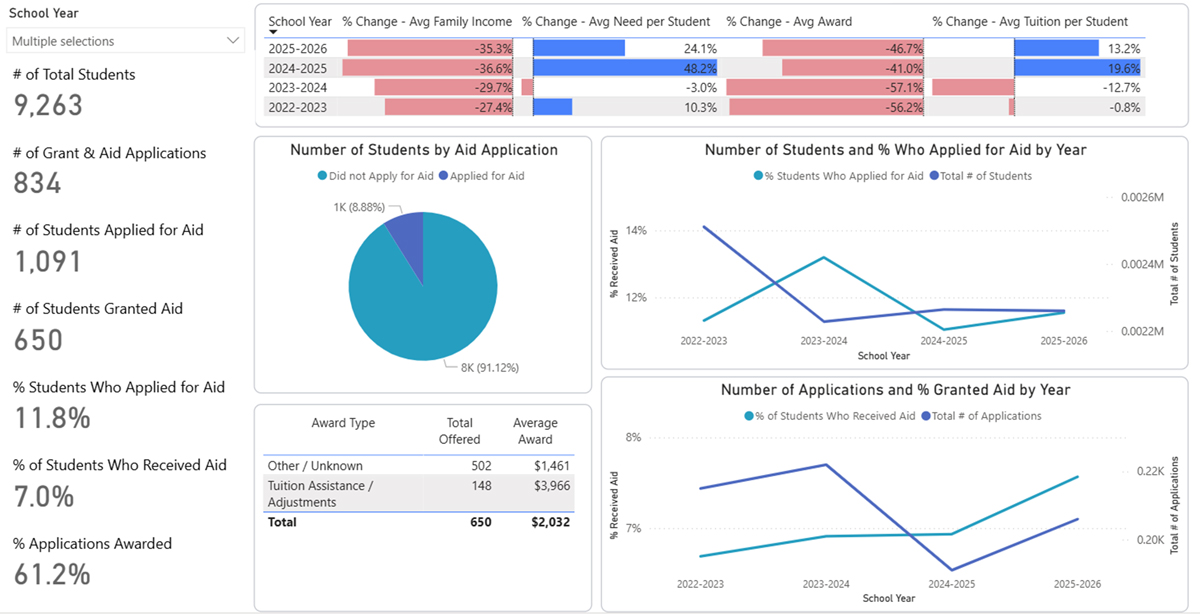
The Financial Aid Effectiveness Dashboards provide an in-depth analysis of financial aid applications, offers, and awards. By combining financial, demographic, and enrollment data, schools can evaluate not just who is receiving aid, but how effectively those dollars are supporting student success and school enrollment.
These dashboards provide more insight into:
- Trends in applications, offers, and award amounts
- Economic and demographic profile of families receiving aid
- Tuition coverage and award amounts by grade, income bracket or group, and more
- Downstream impacts on enrollment longevity and graduation rates
In Action
Your leadership team is evaluating next year’s tuition strategy. Using the Financial Aid Effectiveness Dashboards, you can assess whether aid recipients are returning at comparable rates to non-recipients and determine whether your current allocation strategy is supporting long-term retention goals.
Rather than relying on anecdotal evidence or assumptions, you can use data to guide financial sustainability and accessibility planning.
Enrollment Lifecycle
At a glance: Compare demographics across student milestones, as well as relevant data from other integrated solutions.
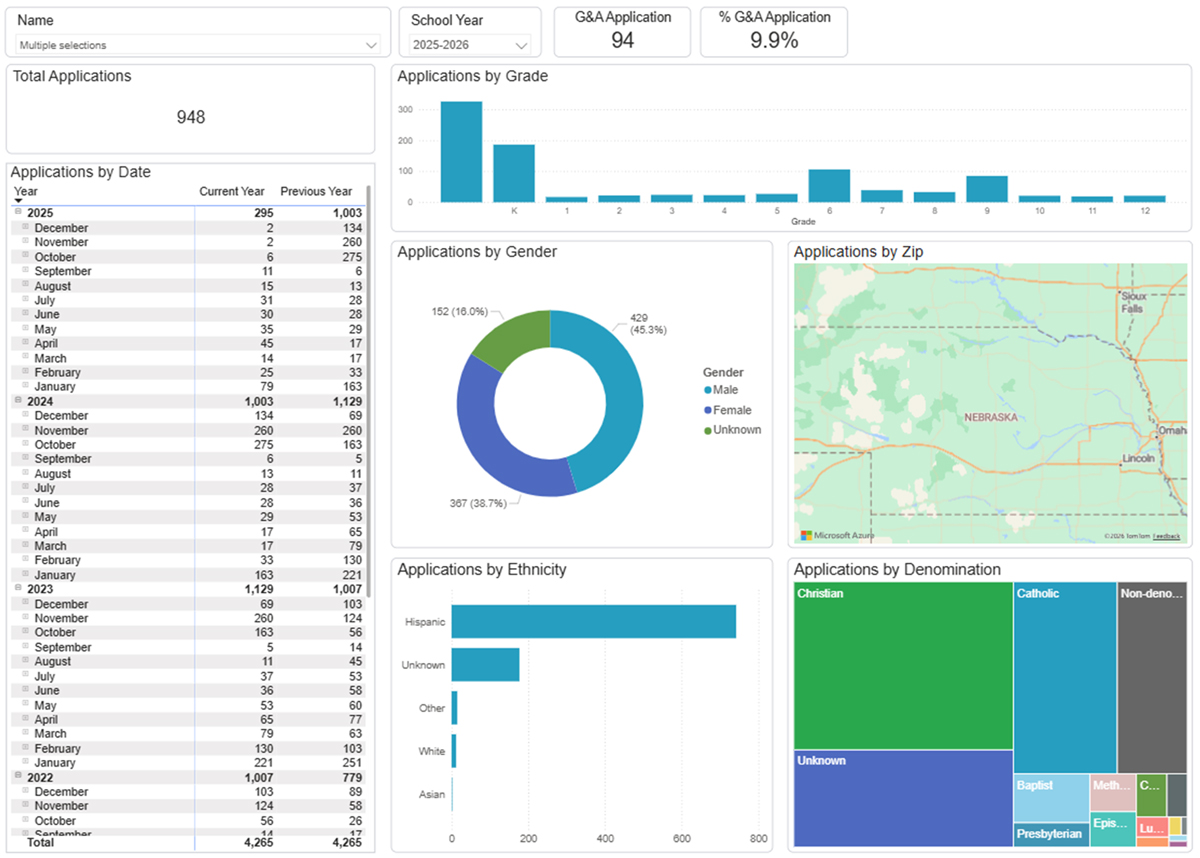
The Enrollment Lifecycle Dashboard provides visibility into five possible major milestones in a student’s tenure:
- Inquiry
- Application
- Enrollment
- Graduation
- Withdrawal
By visualizing movement across these stages, your school can see where gaps can be addressed and identify trends that might otherwise go unnoticed before they become unmanageable.
In Action
If inquiries are strong but applications are declining, the data shown in this dashboard may signal a weak point in your application process. If withdrawal trends are increasing at a specific milestone, leadership can investigate root causes before the impact compounds year over year.
Instead of reacting after enrollment numbers shift, schools can monitor leading indicators throughout the family journey.
How to Access the New Dashboards
Data Insights is included at no additional cost for eligible FACTS clients using multiple products across financial management, enrollment, and student information.
If your school is eligible to use Data Insights (using multiple FACTS solutions with at least one being a financial solution), click here to enable this feature.
Not eligible or not sure? Fill out this form to speak with a FACTS representative and get started with Data Insights today!
From Fragmented Reporting to Proactive Leadership
School leaders shouldn’t have to reconcile multiple reports just to understand enrollment health or financial risk.
With the addition of Delinquency Management, Financial Aid Effectiveness, and Enrollment Lifecycle dashboards, FACTS Data Insights continues to evolve, providing high-level, actionable insights that support confident, proactive decision-making.
As we mentioned during our initial launch, FACTS Data Insights will continue to grow and evolve, so stay tuned for more updates.
Want to share your thoughts about all things Data Insights? Join the conversation on FACTS^SPACE.
Here at FACTS, we’re constantly sharing information about ways to elevate the education experience, from deep dives into new features to quarterly roadmap updates and thought leadership pieces. With all this information, it can be easy to overlook that some schools may just be starting their school management journey and might need a clear breakdown of exactly what all of this means.
Keep reading for our high-level, beginner-friendly guide to getting started in the ed-tech and school management systems world.
What is a campus or school management system?
To put it simply, a campus or school management system (you’ll see the names used interchangeably) is a centralized platform that connects student information, admissions, academics, finance, communication, and reporting across an entire school or campus.
These systems replace disconnected tools with one integrated ecosystem, allowing schools to manage enrollment, student records, billing, financial aid, communication, and data from a single source of truth.
For K–12 schools and districts, a modern campus and school management system is the operational backbone that supports decision-making, compliance, and family engagement. In other words, it makes everything in your team’s day-to-day operations easier.
What does a campus and school management system include?
Most systems combine student data, admissions, academics, finance, communication, and reporting into one platform.
A comprehensive campus and school management system typically includes:
Student Information Management
Centralized student records like demographics, enrollment status, schedules, grades, attendance, family communication, behavioral records, courses, classes, historical data, and more.
Admissions and Enrollment
Tools to manage inquiries, applications, document collection, enrollment decisions, and re-enrollment workflows.
Academic and Classroom Management
Scheduling, gradebooks, attendance tracking, transcripts, and teacher workflows that support daily instruction.
Tuition, Billing, and Financial Aid
Payment plans, invoicing, financial aid awards, scholarships, and family financial accounts tied directly to student records and billing.
Communication and Family Portals
Secure messaging, announcements, forms, and portals that keep families, students, and staff aligned.
Reporting, Dashboards, and Analytics
Built-in reporting and data visualization tools that turn operational data into actionable insights.
Some schools choose a “best of” approach, using different tools from different providers to make up their full products suite, while others choose to go with just one provider to ensure data accuracy and general ease of use.
Why are schools replacing disconnected tools with unified systems?
Unified systems reduce manual work, improve data accuracy, and give leaders better visibility into enrollment and financial trends.
When schools rely on disconnected tools, data lives in silos. This leads to time-consuming duplicate entry, inconsistent records, and delayed decision-making. A unified campus and school management system:
-
Eliminates redundant data entry across departments
-
Reduces errors caused by disconnected systems
-
Improves collaboration between admissions, academics, and finance
-
Provides real-time visibility into enrollment, revenue, and retention
For school leaders, this means less time reconciling spreadsheets, and more time planning strategically. Less data disconnects mean less calls from families, too! Here’s how one FACTS school explains it:
“Our whole goal is to give parents one place to see everything for their student. We really love that they can pay tuition, see grades, and communicate with teachers [in one place]. It really has made the parent’s job a little easier, to where they don’t have five different logins to see what’s going on.”
– Nicole Druck, Student Information Coordinator/Admissions Assistant, Archbishop Carroll High School
How do campus and school management systems support better decision-making?
Short answer: By connecting data across departments and presenting it in real-time dashboards and reports.
Modern systems don’t just store data; they contextualize it. When admissions, student records, tuition, and financial aid data live in one ecosystem, schools can:
-
Track enrollment and attrition trends earlier
-
Forecast tuition revenue with greater accuracy
-
Identify financial aid impacts on net tuition
-
Spot operational inefficiencies before they grow
This shift from reactive reporting to proactive insight is where school management becomes school intelligence. It’s not enough to just have data stored in your system. You need to be able to easily access and understand it without constant cross referencing and pulling reports.
What should schools look for when evaluating a campus and school management system?
We’d suggest paying close attention to integration, data quality, reporting depth, scalability, customer support, and long-term partnership.
Make a list to evaluate solutions, with questions like:
Is the system truly integrated?
Avoid platforms that rely heavily on third-party connectors for core workflows. This is an invitation for slow workflows. Native integration ensures cleaner data and fewer failures.
Does it support the full school life cycle?
From inquiry to alumni communication, the system should support admissions, academics, finance, engagement, and fundraising efforts, not just one department.
Are insights built in, not bolted on?
Look for systems with embedded dashboards and reporting, not tools that require exporting data elsewhere. You’ll also want to ensure there are dashboards and reports you can understand, not just tons of numbers in spreadsheets.
Can it scale with enrollment and complexity?
The goal is always to grow your school community, right? Therefore, you’ll want a system that can support multi-campus structures, growing enrollment, and evolving compliance and data security needs.
Is there real partnership behind the technology?
Technology alone isn’t enough. Implementation, training, and ongoing support matter just as much as features. A great way to evaluate this is to think about onboarding new staff. Will it be difficult for them to call for support? Are there resources and trainings they can access?
How does FACTS fit into campus and school management systems?
FACTS delivers a unified, intelligence-driven ecosystem that connects the entire school, from academics and admissions to finance, all built around creating an exceptional family experience.
FACTS is designed as a whole-campus solution, bringing together:
-
…and more!
Rather than operating as disconnected modules, FACTS connects these functions through shared data and purpose-built workflows, using accurate, connected information to guide smarter school decisions.
TLDR: FACTS makes it easier to do the things you need to do every day, allowing you to spend more time focusing on what really matters, without sacrificing the comprehensive features and workflows your school needs to thrive.
“It’s all-in-one and all the products work together. You can integrate information across them. It’s a one-stop-shop.”
– Joan Bouchard, Superintendent of Catholic Schools at the Diocese of Fresno
Are campus and school management systems only for large schools?
No! Schools of all sizes benefit from unified systems, especially as expectations for data, transparency, and family experience increase.
Smaller schools often feel the pain of disconnected tools first, with limited staff, manual processes, and fragmented reporting. A unified system like FACTS helps level the playing field by automating workflows and providing clarity without adding complexity.
Frequently Asked Questions About Campus and School Management Systems
Is a campus management system the same as a student information system (SIS)?
Not exactly. An SIS is a core component, but a campus and school management system extends beyond academics to includes admissions, finance, communication, and analytics.
Do these systems support private and independent schools?
Yes. Many modern platforms are designed specifically for private, independent, and faith-based schools with unique admissions, tuition, and financial aid needs.
How long does implementation typically take?
Implementation timelines vary, but unified systems often reduce long-term complexity by eliminating multiple parallel implementations. While you’re evaluating options, make sure to ask questions about the implementation experience and what support you’ll be offered.
Final thoughts: Why campus and school management systems are becoming essential
Campus and school management systems are no longer just operational tools; they are strategic assets. Schools that invest in unified, intelligence-driven platforms gain clarity, efficiency, and confidence in their decisions.
As expectations around data, transparency, and family experience continue to rise, connected systems aren’t just helpful. They’re foundational.
Is 2026 the year your school upgrades to a whole campus solution? Contact the FACTS team today to learn how we can transform your school experience!
Every parent has asked the question: “How was your day?” And every teacher has tried to summarize an entire day of learning, play, and care in a few rushed words at pickup. In preschools and childcare centers, those daily moments matter—and so does how we share them.
That’s where digital childcare daily activity reports come in. More than just a summary, they’re a powerful way to build trust, deepen relationships, and create meaningful connections between families and the classroom.
Childcare daily activity reports are digital records that document a child’s meals, naps, activities, milestones, and care throughout the day, giving families real-time insight into their child’s early learning experience.
Why Engagement Matters
Research consistently shows that when parents are engaged in their child’s early learning experience, outcomes improve. Children feel more supported, families feel more connected, and schools build stronger communities. In today’s competitive landscape, early learning centers aren’t just chosen for their curriculum—they’re chosen for how well they communicate. This is where childcare management software plays an increasingly important role in supporting consistent, transparent family communication.
The Problem With Traditional Communication
Paper notes get lost. End-of-day conversations are rushed. And teachers—already managing a full classroom—don’t have time to write personalized updates for every child.
The result? Missed moments, missed opportunities, and missed connections.
How Daily Activity Reports Solve This
Real-time childcare updates and daily activity reports offer a consistent, secure way to share what matters most. Teachers can log naps, meals, diapering, milestones—and even share photos or videos throughout the day. Parents receive updates via mobile app, either in real time or at day’s end, giving them a clear, comforting window into their child’s experience.
Why It’s a Game-Changer for Parents
For families, digital daily reports offer more than updates—they offer reassurance and meaningful connection:
- Transparency builds trust. Parents know what’s happening, when it’s happening
- Parent-child conversations deepen. “I saw you painted a rainbow today!”
- Anxiety decreases. Especially for new parents or those with infants, knowing their child’s needs were met brings comfort.
Why It’s a Win for Teachers and Directors
Digital daily reports don’t just benefit families—they make life easier for your staff, too:
- Save time. Say goodbye to handwritten notes and one-off messages.
- Standardize communication. Every classroom can share updates in the same format.
- Support compliance. Digital records help meet licensing and audit requirements.
- Elevate your program. Professional, consistent communication enhances your reputation.
How FACTS Childcare Management Makes It Easy
FACTS Childcare Management is built for schools using FACTS SIS. That means:
- Reduced manual data entry.
- One login for families and staff.
- Integration with your existing systems.
Teachers can log activities quickly and intuitively. Families receive updates in the same ecosystem they already trust. And directors get centralized oversight—all without adding another system to manage.
Ready to See FACTS Childcare Management in Action?
Learn more and sign up today. Because every child deserves a great start—and every family deserves to feel part of it.
The best way to end a busy year? With the latest wave of enhancements for FACTS SIS Scheduling! With Phase 2 now live, schools get a redesigned, more intuitive experience for managing Course Requests, while students and families benefit from clearer guidance, more transparency, and a smoother request process overall.
These updates also introduce brand-new teacher recommendation tools and thoughtful refinements across Scheduling to help administrators, counselors, and teachers collaborate more effectively. Together, these improvements lay important groundwork for the future of course planning and support the day-to-day workflows schools rely on.
Let’s take a closer look!
Family Portal Course Requests: More Clarity, More Control
Schools can now customize and preview Course Request forms more easily, with enhancements to both Standard and Custom Form options.
Highlights include:
-
Teacher recommendations shown in the form (when enabled)
-
Parent sign-off options for formal approval (without blocking student submission)
-
Minimum and maximum request limits to guide students appropriately
-
Grade-level controls for Custom Forms, allowing schools to enable or disable visibility with a toggle
-
Drag-and-drop variable tools for custom templates
-
Preview mode directly within Scheduling; no need to log in to Family Portal
-
Ability to display school-added requests for a truly complete student view
Families will also notice:
-
Recommended courses appearing clearly in the request list
-
Grade-level and school-added requests shown when enabled
-
A new confirmation banner noting the last saved timestamp and an email confirmation following submission
These enhancements make it easier for schools to configure the experience and for families to understand exactly what’s being requested for the upcoming year.
A Redesigned Grade Level Requests Screen
The Grade Level Requests screen received a visual refresh to simplify how admins assign default requests by grade. Updates include:
-
A cleaner layout for scanning course lists
-
A grade-level filter for faster navigation
-
Blue highlighting to show which courses are included
-
A new Push default requests tool that replaces Load Default Requests
These improvements help administrators assign consistent grade-level defaults while reducing manual steps.
Student Requests: Cleaner, Faster, and More Informative
Phase 2 also introduces a redesigned Student Requests page for both high-level review and detailed student-by-student management.
Here’s what’s new:
-
Additional filtering options (student, grade level, request status, and specific course requests)
-
A new Clear all requests tool based on applied filters
-
A three-tab layout for deeper insight:
- All Courses – view all available courses with indicators for primary, alternate, and recommended options
- Manage Requests – adjust primary or alternate selections quickly
- Recommendations – see teacher-submitted recommendations and supporting notes
Schools also now have direct access to integrated student reports (including transcripts, progress reports, and course request summaries) without navigating away from Scheduling.
Teacher Recommendations: New Workflow to Support Better Course Placement
One of the most anticipated features of Phase 2 is the new Teacher Recommendation workflow within FACTS Classroom.
Teachers can now:
-
View a student’s term grades, final grades, and current averages in one place
-
Recommend courses directly inside Classroom
-
Add optional notes to explain placement decisions
-
Edit or remove recommendations at any time
Administrators can:
-
See all submitted recommendations directly in Scheduling
-
Review and manage them before they appear to students and parents
-
Ensure recommendations flow into Course Requests correctly based on school configuration
This improvement helps reduce manual communication, supports alignment across grade levels, and gives students clearer visibility into proposed placements.
Looking Ahead: Phase 3 and Beyond
Work on Scheduling Phase 3 is already underway, with a focus on enhancements to the Courses and Classes experience, along with new updates to people management in regard to scheduling. Users will soon be able to create scheduling restrictions between students, peers, or instructors, helping schools better reflect real-world needs in their schedules.
Check out our Q3/Q4 Product Roadmap Blog to learn what else is in the works for FACTS and stay tuned for more updates!
As we wrap up another year of learning, it’s the perfect time to pause and look ahead. With 2026 on the horizon and schools already thinking about next year’s goals, we’re doing the same here at FACTS. This roadmap brings together highlights from Q3 and exciting advancements coming in Q4 and beyond, showing how your feedback continues to shape the future of our platform. From more secure access to smarter scheduling, we’re focused on helping you finish the year strong…and start the next one even stronger.
Product Updates:
Family Dashboard Beta Program (Cross-Product)
What’s Near with Family Dashboard Beta Program
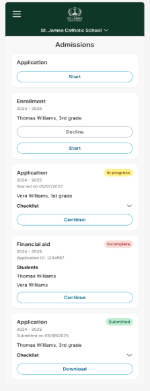
Beginning in January, we will begin the beta program for Family Dashboard. This dashboard is a mobile-first intuitive hub where families can easily view and complete all required steps for admission and financial aid.
What’s Next with Family Dashboard Beta Program
Family Dashboard Pt. 2:
The Family Dashboard will keep growing, with billing, payment plans, notifications, academics, and additional features on the way.
Single Entry Point:
By the end, the dashboard will evolve into a unified experience for all FACTS users. Whether staff, families, or both, it becomes one universal gateway that brings every task, tool, and access point across the FACTS platform into a single experience.
Student Information System
What’s New with Student Information System
Unified Login:
Unified logins for all FACTS platforms, complete with multi-factor authentication, are being launched incrementally. Beta users are already active!
What’s Near with Student Information System
Dashboard Builder:
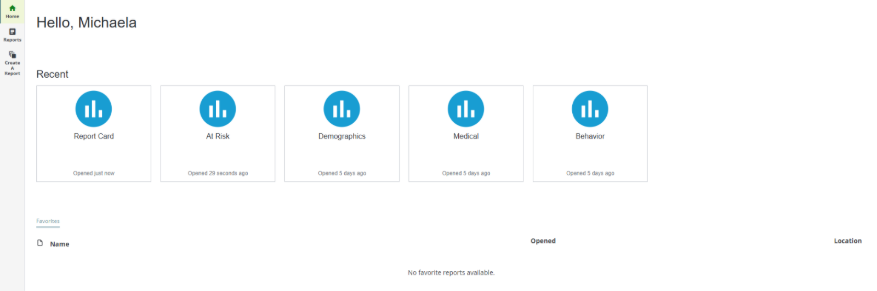
The new Dashboard Builder uses PowerBI to deliver clear, customizable dashboards that put your school’s data at your fingertips.
District Management Tool Phase 1:
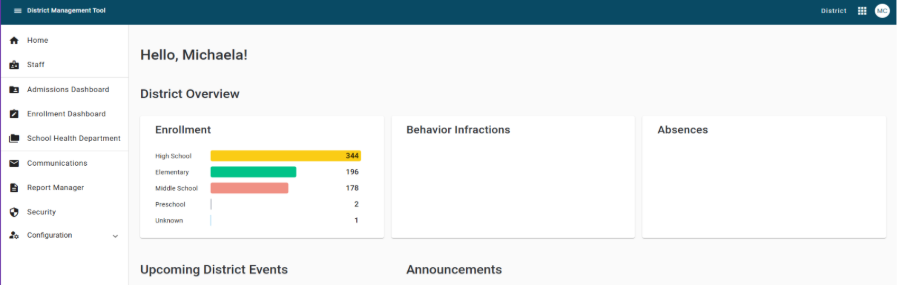
Phase 1 of our District Management Tool delivers a more unified platform experience for district and diocesan leaders by centralizing SIS security access, district-wide communications, and NCEA reporting into one streamlined workflow. This brings greater visibility, consistency, and efficiency across the entire diocese or district.
Report Manager Enhancements:
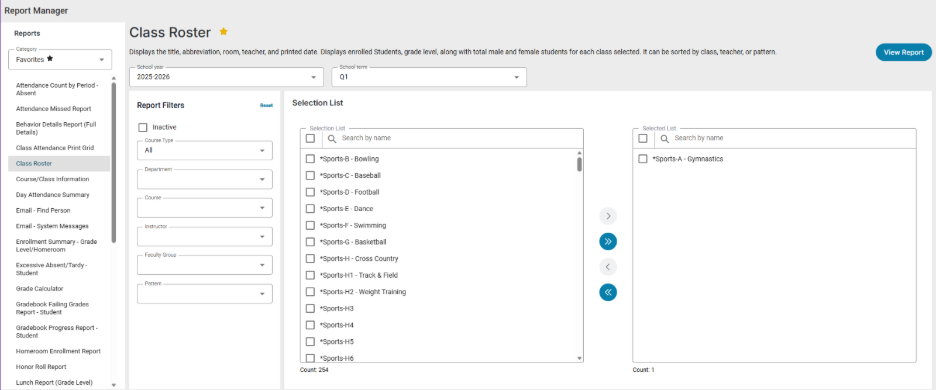
We are enhancing SIS Report Manager to make generating and sharing reports faster, easier, and more intuitive than ever.
Scheduling Phase 2 Updates:
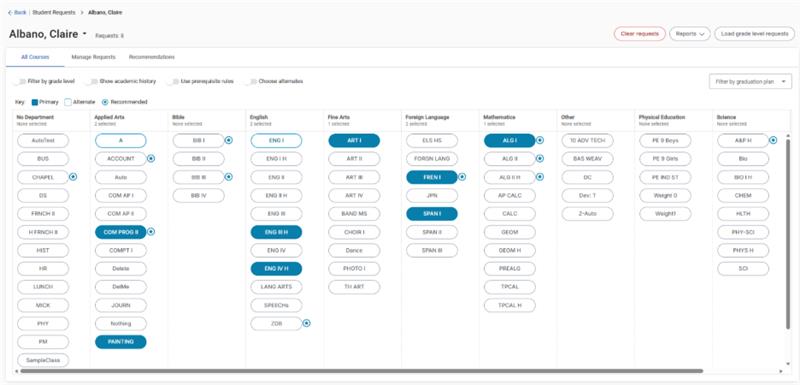
Phase 2 of Scheduling launches on December 8th, bringing Course Requests enhancements to Family Portal configuration, the student and parent experience, Student Requests, Grade Level Requests, and the new Teacher Recommendation workflow in Classroom and Scheduling.
What’s Next with Student Information System
District Management Tool Phase 2:
Phase 2 of the District Management Tool will empower district and diocesan leaders with aggregated, diocese-wide reporting, providing clear insights into attendance, student enrollment, and other key metrics to support data-driven decision-making.
Scheduling Phase 3 Updates:
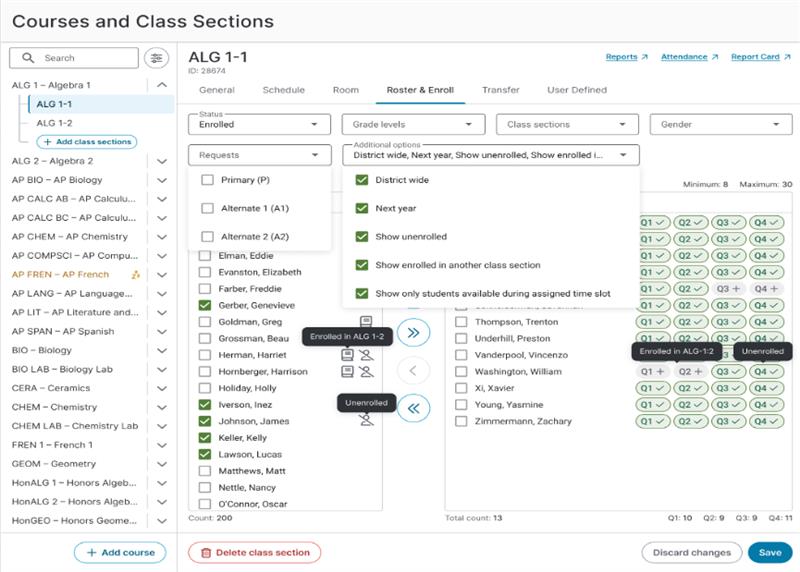
Phase 3 of Scheduling will deliver an updated Courses & Classes experience, offering smoother management, improved usability, and more flexible scheduling settings across the board.
Scheduled Email Sends in Communications:
Enhanced communication tools are coming soon for the SIS, including the ability to schedule emails, making it easier to plan, automate, and streamline your outreach.
Application & Enrollment
What’s New with Application & Enrollment
Inquiry Series in Email Series Manager:
As the newest feature of Email Series Manager, Inquiry Series enables schools to create automated email campaigns that are sent to parents who submit an inquiry form. This feature makes it easier than ever to stay in touch with prospective families!
What’s Next with Application & Enrollment
Parent Experience Redesign:
We are modernizing the entire admissions journey by delivering a refreshed look, full mobile optimization, and a completely reimagined family experience that makes every step smoother and more intuitive. Modernization began with the Inquiry Series in Email Series Manager, and in 2026 we’ll begin development on brand new Application and Enrollment screens.
Financial Aid Management
What’s New with Financial Aid Management
IRS Integration:
- Most Recent Year Tax Return: We have added the ability to retrieve the most recent tax year transcripts from the IRS.
- W2s: We added the ability for applicants and co-applicants to get their W2s directly from the IRS in addition to their tax returns. This will include both the prior year and most recent year W2s as they become available through the IRS.
Turn Off W2 Wage Adjustment & New Year Document Override:
- Currently, our system automatically adjusts a family’s income based on the most recent W2 when paired with a prior year tax return and will use the most recent tax return when submitted by a family.
- Some of our schools and scholarship organizations have requested the ability to turn off this automatic adjustment, allowing them to receive more recent years’ W2 without it affecting the family’s assessment, or still request and use the prior year tax return in the assessment even when the most recent year has been received. This will be an optional setting.
Action Panel Preference Institution List in Alphabetical Order:
- We have ordered the preference institution list alphabetically when navigating from the action panel to assist with reviewing students.
New Fund Page and Application Report Pages:
- As part of our ongoing modernization, we’ve updated the Fund Detail Awarding and Application Report pages with a refreshed design, full-screen viewing, faster reporting, and improved user experience! You may now toggle between the new view and classic views.
What’s Near with Financial Aid Management
Annual Tax Return Changes:
- In Q4 every year, we update Financial Aid Management to account for IRS changes to tax documents.
Institution Defined Fields:
- We are adding the ability to assign attributes to schools titled “Institution Defined Fields” under a group so that reporting can be filtered by those attributes.
Address Validation:
- Using the USPS address validator, we can suggest an accurate address to the applicant via the application process. This will help prevent typos on the application.
What’s Next with Financial Aid Management
Prefill Custom Questions for Returning Users:
To continue to make the applicant process easier for returning families, we are adding the ability to select if the responses to a custom question should be pre-filled based on last year’s responses. This can be chosen per custom question, and applicants will still have the ability to update the response if something has changed from last year.
Address Verification:
We’ll be introducing an address verification process into the application process to verify the address provided by the applicant is their address.
Returning Scholar & Returning New to Aid:
We will implement a way to identify returning scholars from returning students that are new to financial aid so that institutions have more options on how they award aid and can more easily identify specific demographic groups.
Providing Adjusted Mean Income (AMI) in System:
We are investigating ways to bring the Education Choice for Children Act (ECCA) definition of income of Adjusted Mean Income (AMI) into Financial Aid Management.
Payment Plans & Billing
What’s New with Payment Plans & Billing
Adjustment Detail by Date Range report:
The Adjustment Detail by Date Range (no balances) report within FACTS Payment Plans provides charge, credit, and payment amounts for Institution Accounts, organized by Adjustment Reason, within a user-specified date range. This new report is derived from the existing Balances with Adjustment Detail report but focuses solely on date-specific details and excludes balance information.
What’s Near with Payment Plans & Billing
Parent Invoices for School Choice Programs:
To meet state requirements, we aim to provide parents with compliant documentation that supports state-level funding processes. This ensures regulatory adherence while simplifying the experience for families.
Payment Plan Modernization:
Modernizing the payment plan enrollment experience enables parents to sign up for a payment plan from any device, streamlining and simplifying the enrollment steps, and enhancing existing processes. The updated experience will include compliant disclosures and leverage a design system to ensure a modern, accessible, and user-friendly interface.
What’s Next with Payment Plans & Billing
Auto-Replenish Prepay Accounts:
We will be working on adding the ability for families to have their Prepay Account automatically refreshed from a saved account when the balance reaches a certain threshold.
Love this idea and want the most up-to-date news? “Like” the idea in FACTS^SPACE and you’ll be among the first to know!
Mass Transfer of Funds & Credits:
We are excited to announce that we will soon be adding the capability to transfer funds and credits in mass. Previously, we introduced this feature for balances due and received valuable feedback indicating a need for similar functionality for funds and credits.
As we move through the school year, our team remains focused on ensuring our solutions simplify your daily work and enhance the experience for your families. From scheduling improvements to financial aid enhancements, every update is designed with your feedback in mind. We can’t wait to share even more in the months ahead, so stay tuned and don’t forget to join the conversation in FACTS^SPACE!
The semester is winding down, holidays are nearing, and classrooms are abuzz with activity, deadlines, and understandable fatigue. Even with all this chaos, it’s still the perfect time to pause and reflect on those who make every day of learning possible. American Education Week (November 17–23) and Education Support Professionals Day (November 19) call on schools across the country to celebrate the people who give education its heart.
Teacher appreciation is more than a kind gesture; it’s about driving engagement, motivation, and retention, a reminder that behind every story of student success are educators and staff pouring in patience, creativity, and care.
How Does Every School Become a Community of Champions?
Education is teamwork in its purest form. Teachers spark curiosity, but an entire support network keeps learning running smoothly—paraprofessionals who guide small groups, custodians who keep spaces safe, bus drivers who ensure on-time arrivals, cafeteria workers who fuel the day, and administrators who keep the mission on course.
Teacher appreciation becomes an act of inclusion and belonging when this gratitude extends to all these professions. Gratitude moves from moment to mindset when schools celebrate shared effort and togetherness.
How Can Schools Turn Appreciation Into Something Tangible?
Meaningful recognition doesn’t require a big budget; just consistent intention. Schools can elevate everyday appreciation through ideas like:
-
Handwritten notes from students or families with specific praise
-
Gratitude boards or digital walls for quick “thank you” messages
-
Monthly staff spotlights in newsletters or morning announcements
-
Peer-to-peer recognition programs celebrating colleague strengths
When recognition becomes part of the daily culture, not just an annual event, morale grows.
What Should We Understand About Educator Fatigue and Gratitude?
Educators work long hours balancing academic, emotional, and operational demands. Burnout remains the top reason teachers leave the profession. While gratitude isn’t a cure-all, it helps educators reconnect to their purpose and the reason they stepped into the classroom to begin with.
Studies show that regular appreciation improves mood, resilience, and retention. Gratitude raises levels of dopamine and serotonin (the brain’s natural “feel-good” chemicals) supporting optimism and reducing stress.
A simple “thank you” from leaders or peers can strengthen collaboration, improve problem-solving, and help school communities stay resilient during challenging times.
How Can Schools Build Sustainable Support Systems for Staff?
Schools can make appreciation sustainable with daily, embedded practices such as:
-
Starting staff meetings with wins or teamwork highlights
-
Recognizing mentorship and growth among colleagues
-
Protecting planning time and wellness breaks during busy cycles
Small, intentional actions remind educators that leadership sees and values them as people, not just their output.
How Do We Shift Seasonal Appreciation into a Year-Round Culture?
Consistent recognition is foundational to strong school culture. When principals or department heads celebrate milestones, write notes, and spotlight staff regularly, appreciation becomes contagious. Consistency builds trust, strengthens retention, and turns gratitude into a leadership tool that sustains motivation all year.
However, recognition is most powerful when it connects effort to impact. Instead of general praise, highlight outcomes: “Your literacy workshop raised student engagement scores 18% this quarter.” Connecting gratitude to measurable impact helps educators see their true worth and reinforces confidence in their craft.
How Can Students and Families Take Part in Showing Gratitude?
Gratitude grows when the entire school community participates. Schools can invite families and students to:
-
Write thank-you postcards before winter break
-
Record short appreciation videos
-
Host a “Gratitude Week” recognizing everyone from bus drivers to counselors
These actions teach empathy, kindness, and perspective, skills as valuable as academics.
The Role of Storytelling in Elevating Recognition
School newsletters, social media posts, and blogs can capture inspiring stories of educator creativity, perseverance, and heart. Highlight teachers whose lessons sparked curiosity or staff members who consistently go above and beyond behind the scenes.
You can also bring storytelling into staff meetings, professional development days, or family events by sharing “micro-moments” of impact, those small wins that often go unnoticed but mean everything to the people involved. When schools regularly share these stories, they deepen community connection, make gratitude more visible, and remind everyone why their work matters.
How Do We Measure the Ripple Effect of Appreciation?
Appreciation starts with emotion, but its impact is measurable. Schools that prioritize recognition commonly report:
-
Higher employee retention and engagement
-
Reduced absenteeism and burnout-related leave
-
Increased collaboration across departments
-
Elevated student satisfaction and performance
Tracking these outcomes helps leaders make the case that gratitude isn’t just culture; it’s strategy.
Turning Gratitude Into Real Momentum
As we head into 2025, let’s make teacher appreciation a year-round commitment. Recognition sustains the educators who sustain students. When schools intentionally foster cultures of thanks, creativity flourishes, relationships strengthen, and students thrive.
If your school is looking for additional ways to support teachers through coaching, professional development, or instructional leadership resources, FACTS’ educational services can help. Explore how our team partners with schools to empower educators all year long.
A Growing Opportunity for Private Education
Across the country, school leaders are exploring ways to expand access, increase affordability, and support families seeking a high-quality private education. Scholarship Granting Organizations (SGOs) are central to that effort. Whether operating within an existing state program or preparing for future opportunities under the Federal Scholarship Tax Credit (FSTC), understanding how SGOs partner with schools is an essential first step.
This blog explores what SGOs do, how partnerships with schools work, and why schools benefit from collaborating with SGOs, especially in a future FSTC environment.
What Is an SGO?
A Scholarship Granting Organization (SGO) is a nonprofit entity that:
- Raises tax-credit eligible donations
- Awards scholarships to eligible students
- Ensures program compliance and reporting
- Serves as a bridge between donors, families, and schools
SGOs provide the infrastructure, accountability, and operational support required to run tuition-assistance scholarships at scale.
Why Do Schools Partner with SGOs?
Schools partner with SGOs to make scholarships more accessible, sustainable, and compliant. Instead of each school managing complex scholarship workflows alone, they can leverage an SGO’s systems, expertise, and fundraising structure.
| Without an SGO | With an SGO |
|---|---|
| School manages everything alone | SGO manages scholarship administration |
| High administrative burden | Reduced workload on school staff |
| Limited donor pathways | Access to tax-credit eligible donations |
| Greater compliance risk | Standardized, auditable processes |
The Added Value Under FSTC
If a state opts in to the Federal Scholarship Tax Credit program, SGOs will play a critical role. Under FSTC, SGOs help:
- Facilitate a new source of tax-credit eligible donations, including $1,700-per-donor contributions
- Manage federal compliance, documentation, and reporting
- Support schools in scaling scholarships more effectively than acting independently
Partnering with an SGO gives schools a future-ready structure to respond immediately if their state participates in FSTC.
How Do SGOs and Schools Work Together?
Partnerships between SGOs and schools typically follow a predictable cycle:
- Introduction & Alignment: The SGO outlines expectations, timelines, and eligibility requirements. The school reviews program fit and readiness.
- Onboarding: Schools assign a point-person (often someone in admissions, finance, or the front office). SGOs provide resource toolkits and guidance.
- Family Outreach: Schools share the SGO’s application information with families. SGOs remain available for questions and clarification.
- Application & Award Cycle: Families apply through the SGO. Schools verify enrollment. SGOs award scholarships and provide the necessary reporting.
- Ongoing Communication: SGOs share updates, timelines, donor reporting, and offer support throughout the year.
Roles and Responsibilities
Partnerships thrive when roles are clear and complementary:
| Partner | Key Responsibilities |
|---|---|
| SGO | Fundraising, donor compliance, application and award processing, reporting |
| School | Communicates with families, verifies enrollment, identifies a school contact |
| Families | Apply, submit required documentation, and stay engaged in the process |
How Do Donors Collaborate with SGOs?
SGOs do not replace a school’s donor relationships. Instead, they enhance them by providing a compliant giving pathway for donors who want their contributions to qualify for a tax credit. Schools continue to build and steward donor relationships, while SGOs handle the legal and reporting framework that makes those gifts tax-credit eligible.
This collaboration creates a win-win:
- Donors receive a clear, confident giving experience
- Schools expand available scholarship dollars
- SGOs ensure compliance
Two Common Award Models
There are two widely used approaches in SGO programs:
School-Guided Award Model: Schools help determine scholarship amounts for eligible students
SGO-Directed Award Model: The SGO sets award amounts, and the school verifies enrollment
Both models work effectively when expectations are clear up front.
Why Learning This Now Matters
Now that Nebraska has officially opted in to the FSTC Program, and a few other states such as Tennessee have given verbal indications that they plan to participate, learning the SGO model matters more than ever. It helps schools:
- Avoid confusion later as more states opt in and details roll out
- Prepare leadership and boards for emerging policies and governance decisions
- Quickly activate if their state’s governor opts in
- Better understand the national direction of school choice initiatives
- Respond faster and more confidently as policies evolve
Together, SGOs and FACTS provide the structure and systems for efficiency, scalability, and sustainability, helping schools focus on what matters most: educating students and supporting families.
In an environment where educational policy continues to shift, FACTS helps schools and SGOs stay informed and prepared, ensuring they’re ready to respond to new opportunities for families.
What This Means for Schools and SGOs
SGOs and schools share a common goal: expanding access and opportunity for students and families. By understanding how SGOs operate, how partnerships function, and where each party adds value, leaders can confidently prepare for new scholarship opportunities, whether through state-level programs or a future federal tax credit. The stronger the collaboration, the more effectively families are supported.
Equip Your SGO for What Comes Next
As demand for scholarship programs grows, SGOs need tools that streamline application intake, eligibility verification, and documentation without sacrificing accuracy or efficiency. FACTS’ Application Builder offers a configurable, secure way to collect data, verify information, and manage applicants all in one place. It’s more than a form builder; it’s a scalable solution designed to strengthen your program as policies evolve.
Ready to simplify your scholarship eligibility and verification workflows? Explore the FACTS Application Builder today.
How Childcare Centers Build Trust Through Everyday Transparency
In early childhood education, trust is built through consistent, transparent communication, especially in the everyday moments that matter most. A shared smile at drop-off. A photo of a child’s first painting. A quick message letting a parent know their little one had a great nap.
These small interactions shape how families feel about their child’s care…and about the educators who provide it. But when communication is inconsistent or unclear, trust can fade. That’s why transparency matters. When families feel informed throughout the day, they feel confident. And when early childhood educators communicate clearly, they build lasting relationships that support every child’s growth.
The Transparency Gap in Traditional Childcare Communication
Even with the best intentions, many early childhood programs still rely on outdated communication methods. In fact, research shows daily communication between parents and teachers plays a vital role in supporting parents, leading to positive child development and family well-being.
Families want to feel connected to their child’s experience, but traditional methods like sticky notes or brief pickup chats often fall short. Without real-time updates, meaningful moments can slip through the cracks—leaving families feeling disconnected and unsure.
What Happens When Families Feel Out of the Loop
Educators juggle countless responsibilities, and without a streamlined way to share real-time updates, families may miss out on important milestones or daily highlights. This lack of transparency can lead to anxiety, frustration, and a breakdown in trust.
In a competitive childcare landscape, poor communication can also impact enrollment and childcare retention—especially when families feel out of sync with their child’s day.
What Transparency Looks Like in Practice
Fortunately, technology is making it easier than ever to keep families informed and engaged.
Real-Time Childcare Updates for Real Peace of Mind
With childcare management software, educators can easily capture and share the moments that matter—whether it’s a developmental milestone or a midday snack. Secure parent communication tools allow families to receive timely updates through a trusted app, offering a reassuring glimpse into their child’s day.
This kind of transparency in childcare helps families feel connected, even when they can’t be there in person—and strengthens the bond between home and classroom. And boosting parent engagement creates peace of mind.
Transparency Builds Trust
Trust isn’t just a nice-to-have—it’s essential for strong family-school relationships. And transparency is one of the most effective ways to build it.
Connection, Confidence, and Community
- Transparency builds confidence in caregivers and programs.
- Parent-child conversations deepen: “I saw you painted a rainbow today!”
- Anxiety decreases—especially for new parents or those with infants.
- Directors gain oversight and can ensure consistent communication across classrooms.
In a competitive childcare landscape, building trust and transparency helps with retention—especially when families feel seen, heard, and informed.
How FACTS Childcare Management Makes It Easy
FACTS Childcare Management is an integrated childcare software solution that simplifies transparency and streamlines operations for everyone involved—from administrators to families.
One Platform. One Login. One Trusted Partner.
Purpose-built for the early childhood learning market, FACTS Childcare Management is easy for any center to get up and running quickly within days. Centers can easily onboard with minimal disruption, thanks to smooth integration and intuitive tools designed to make daily management simpler. Key advantages include:
- Reduced manual data entry.
- One login for families and staff.
- Seamless integration with existing systems.
Teachers can log activities quickly and intuitively. Families receive updates in an ecosystem trusted by educators and families alike. And directors get centralized oversight—all without adding another system to manage.
Discover the Future of Childcare Management With FACTS
If you’re ready to strengthen family engagement and streamline communication, now’s the perfect time to explore what FACTS Childcare Management can do for your program.
See It in Action—Schedule Your Demo Today
FACTS SIS schools can now experience our childcare management solution firsthand.
- Flat, affordable monthly pricing
- Built for the childcare market
Learn more and sign up today. Because when families feel informed and connected, everyone wins.
The Federal Scholarship Tax Credit (FSTC) program, passed as part of the One Big Beautiful Bill, creates a new opportunity for families and donors to support K–12 education. The program allows individual taxpayers to receive a federal income tax credit for contributions to approved Scholarship Granting Organizations (SGOs), which then award scholarships for qualified educational expenses, such as tuition, tutoring, and technology.
While the Treasury Department will issue final regulations over the next year, schools and dioceses can take meaningful steps now to prepare. Planning ensures Catholic and faith-based communities are ready to support families and donors as this new opportunity takes shape.
Learn the Basics of FSTC
The Federal Scholarship Tax Credit allows individuals (not corporations) to contribute to approved SGOs and claim a dollar-for-dollar credit on their federal income taxes. The contributions fund K–12 scholarships for families whose income is within 300% of Area Median Income (AMI)—a level that includes many middle-income households.
Take these steps to understand better how FSTC will impact your school:
- Designate a point person to track updates and communicate program basics to school leaders.
- Connect with your state Catholic conference or CAPE affiliate for coordinated guidance.
- Begin compiling a list of SGOs operating in your area.
Know the Limits and Manage Expectations of the FSTC
The Federal Scholarship Tax Credit caps contributions at $1,700 per taxpayer each year, or potentially $3,400 for joint filers (pending Treasury guidance). The cap is designed to keep the program broad and sustainable, and it can be stacked with state tax credit programs if managed correctly.
Take these steps to build clarity and confidence around FSTC giving:
- Educate donors about the difference between federal and state credits, including the “no double-dipping” rule.
- Coordinate with diocesan communications teams to ensure consistent language across parishes and schools.
- Start building a donor education toolkit that includes key messages and sample outreach templates.
Understand How States Participate in FSTC
Each state must formally opt in to the Federal Scholarship Tax Credit program before families and donors can benefit. The state will then certify SGOs to receive contributions and distribute scholarships.
Take these steps to get a full picture of your state’s FSTC participation:
- Monitor your governor’s and legislature’s positions on participation.
- Stay connected to associations that engage in state-level discussions about the opt-in process.
- Be ready to share updates with donors and families as your state’s decisions progress.
Strengthen Your School’s or Diocese’s Partnership With SGOs
Strong relationships between schools, dioceses, and SGOs will make implementation smoother once the Federal Scholarship Tax Credit program begins. SGOs will manage compliance and donor reporting, while schools will help families understand eligibility and apply for scholarships.
Take these steps to communicate with SGOs about FSTC:
- Reach out to SGOs in your state to establish or renew partnerships.
- Ensure your systems can securely share enrollment or eligibility information if needed.
- Begin developing communication materials that explain how the FSTC complements existing state programs.
Build Donor Readiness in Advance of FSTC
Donor education will be critical to prepare for the Federal Scholarship Tax Credit program. Many donors will want to understand how this new federal credit interacts with their state’s tax credit program and how their contribution directly helps students.
Take these steps to prepare donors for FSTC:
- Coordinate messaging with diocesan development or stewardship offices.
- Prepare simple materials that outline how donations flow from the donor to the SGO and ultimately to scholarships for students.
- Encourage donors to consult their tax advisors once Treasury releases final rules.
Prepare Internal Systems and Staff for FSTC Changes
Schools that plan ahead will find it easier to manage family communication and recordkeeping once Federal Scholarship Tax Credit scholarships begin to flow.
Take these steps to prepare your staff for changes related to FSTC:
- Confirm that your financial aid or tuition management systems can track scholarship awards accurately.
- Train your admissions and business office teams on how federal scholarships will integrate with existing tuition or aid processes.
- Establish a clear internal point of contact for scholarship-related questions.
Prepare Families for What’s Ahead With FSTC
Families will look to schools for clear information once the Federal Scholarship Tax Credit becomes available. Helping them understand who qualifies, how to apply, and what documentation they may need will build trust and confidence from the start.
Take these steps to prepare FSTC information for families:
- Begin creating simple family FAQs that explain the purpose of the FSTC and how it may help with tuition.
- Plan to host short informational sessions once more details are available.
- Reassure families that participation will be voluntary and that schools and SGOs will guide them through the process step by step.
- Coordinate with SGOs to ensure consistent messaging on eligibility and timing.
Stay Engaged and Informed in FSTC Updates
Treasury and state agencies will release more details about the Federal Scholarship Tax Credit program in 2026, including SGO certification and reporting procedures. Staying informed, and participating in conversations where possible, will help schools and dioceses anticipate what’s next.
Take these steps to stay informed about FSTC updates:
- Subscribe to Treasury and FACTS updates for ongoing rulemaking information.
- Attend webinars or training sessions hosted by FACTS and partner organizations.
- Share key takeaways with leadership teams and boards.
Why Early FSTC Preparation Matters
The Federal Scholarship Tax Credit represents one of the most significant opportunities in decades to expand access to private and faith-based education. By understanding the basics, building partnerships, preparing families, and setting up systems now, schools and dioceses can ensure they’re ready to lead when the program launches
Ready to Learn More?
Want more insights on what the Federal Scholarship Tax Credit means for schools, dioceses, and SGOs?
Check out our recent webinar, Federal Scholarship Tax Credit: From Legislation to Implementation, to hear from FACTS experts and partners on the latest Treasury updates and learn how to prepare your community.
For a closer look at what is defined in statute and what still requires Treasury rulemaking, download our FSTC Rulemaking Readiness Guide.
Admissions teams face a constant challenge: keeping up with frequent, repetitive emails to prospective families. From reminders about incomplete applications to nurturing new inquiries, manual outreach can be time-consuming and prone to errors. That’s why we’re so excited to announce the new Inquiry Email Series feature coming to FACTS Application and Enrollment!
This exciting new feature launches October 31 and is designed to help schools nurture early interest automatically, engaging families without hours of work for your team. Keep reading to learn more!
What is the Inquiry Email Series Feature?
Part of our Email Series Manager, the Inquiry Email Series feature streamlines the process of sending admissions emails. Schools can set up a series of emails triggered by specific actions within Email Series Manager, such as starting an application, failing to submit an enrollment packet, or simply expressing interest through an inquiry form. This approach mirrors marketing automation platforms like HubSpot.
Think of it as your built-in admissions assistant: sending reminders, sharing curated school highlights tailored to students’ interests, or guiding parents to complete the next step.
You can schedule messages based on when a family first inquires (“Send two days after inquiry,” “Follow up in a week,” etc.), and every message in the series will deploy automatically, so your staff can focus on personal connections instead of inbox monitoring.
What Segmentation Options Does It Offer?
Not every prospective family needs the same message. With flexible filters, you can target specific audiences by grade level, school division, language, or even student interests or answers to specific questions asked on your inquiry form. Create unique series for middle school vs. high school families or craft messages in Spanish or English. Emails can even be routed to relevant staff for added personalization, allowing, for example, an athletic director to reach out directly to potential student athletes.
What is the Family Experience Like?
Parents enter the email series by submitting an inquiry form, instantly receiving relevant communications. Every email includes a clear unsubscribe link, ensuring compliance and giving families control over their inbox. The platform is optimized for mobile, too, with simple formatting that resizes for any device so families can stay up to date on the go.
Not only do emails help keep families on track, but they can also offer resources or one-on-one help with any part of the application process that may be holding them up. Most importantly, however, these emails help families feel a personal touch from your school and remind them that their student isn’t just a number to you.
Coming Soon!
We’re excited to bring this feature to schools like yours very soon and help simplify your workflow and elevate family engagement from the very first inquiry.
Stay tuned for the launch and check out our interactive demo to see the Inquiry Email Series in action!
By now you’ve probably heard the buzz….and we’re excited to confirm that FACTS Data Insights is officially launching on October 27, 2025!
This new feature brings your FACTS data together into one clear, visual experience, giving you the insights you need to make confident decisions about enrollment, student success, financial planning, and so much more. The best part? It’s included free with eligible FACTS solutions!
As we count down to launch, here’s a quick preview answering the most common questions we’ve heard from schools and dioceses so far.
Q1: What exactly is Data Insights?
FACTS Data Insights is a new analytics feature that provides you with interactive dashboards showing key trends across your FACTS solutions. This includes Student Information System (SIS), Financial Aid, Payment Plans, and Application and Enrollment.
It’s designed for school, district, and diocesan leaders who want to see a big-picture view of their institution’s health without running multiple manual reports.
Q2: Who can use it?
Data Insights is available to schools, districts, and dioceses that use multiple FACTS products, with at least one being a financial product (FACTS Payment Plans or FACTS Financial Aid Management).
This means that if you use our Application and Enrollment platform or SIS plus Payment Plans or Financial Aid Management, you’re eligible to use Data Insights! Schools or dioceses that also use only our financial solutions are eligible as well.
If that’s you, you’ll get access at no additional cost once the feature launches. And if it’s not you yet, this is a great reason to consider bringing additional FACTS solutions to your school! Contact our team to learn more about the difference our solutions can make for your families.
Q3: What types of data can I see?
You’ll be able to view high-level, aggregated data that helps you:
-
Track enrollment trends (incoming, returning, and withdrawn students)
-
Understand financial health and tuition patterns
-
Identify retention or affordability risks early
-
Share clear insights with your board or other stakeholders
Data Insights gives leadership teams a fast, visual overview of what’s happening across your school community.
Q4: Can I drill down to individual student data?
No; FACTS Data Insights is designed to show aggregate, not personally identifiable data.
It’s built for strategic decision-making, not individual tracking. It helps you see trends that guide long-term planning while keeping student privacy protected.
Q5: How is this different from what we already have?
Before, you could run reports in individual FACTS products (SIS, Payment Plans, Financial Aid Management), but each report only tells part of the story.
Now, Data Insights brings those pieces together into one dashboard view, so you can:
-
Save time pulling multiple reports
-
Discover patterns you couldn’t see before
-
Make data-backed decisions with confidence
-
Eliminate platform-based silos and keep your entire team informed
Q6: Is this really free?
Yes!
If your school or diocese is eligible, FACTS Data Insights is included at no extra cost. It’s our way of helping you get more value out of the FACTS solutions you already use.
Q7: How can I learn more?
You can also tune into our on-demand webinar, where FACTS Data Insights experts will answer frequently asked questions about this exciting new feature and highlight real world examples of how these analytics can help schools make more informed decisions.
Q8: How do I activate FACTS Data Insights for my school, district, or diocese?
After October 27, you’ll be able to enable Data Insights directly in your FACTS system. To do so, reach out to your Account Manager, who will handle all the details to make this feature available in your solutions.
Q9: What’s next?
One of the greatest things about FACTS Data Insights is that it will constantly grow and provide more insights to schools. Additional dashboards, including customizable options, and data views are already in development for future updates. Stay tuned!
FACTS Data Insights will change the way you see your school — literally. By bringing your enrollment, finance, and student data together, you’ll have a clearer, faster way to make decisions that move your mission forward. We can’t wait to see how making the most of your data positively impacts your school community.
Preparing families for the financial aid cycle is about more than just paperwork; it’s about building trust, providing guidance, and reducing barriers to access. By starting early, communicating clearly, and leveraging tools like IRS Integration, your school can take a proactive approach to help families feel supported at every step.
Keep reading for some proven strategies from FACTS experts to make the financial aid cycle stress-free for both your families and your school.
What Preparations Can Schools Do to Simplify the Financial Aid Process for Families?
Before families even begin applying, it’s worth it to carve out some time to review and align your internal processes:
-
Review Your System & Setup: Confirm open/close dates, test the application experience, and review custom questions.
-
Check Your Documents & Policies: Review your internal aid policy, required documentation list, award strategy and prioritization, and communication materials to ensure they are clear and consistent.
-
Coordinate Internally: Host a kickoff meeting with your admissions, finance, and communications teams to align messaging and responsibilities. You’ll also want to make sure everyone has the access they need and assign staff to be available for office hours.
-
Create a Family Engagement Strategy: Set dates for financial aid nights or webinars where families can ask questions, update or create helpful resources, and proactively reach out to families who struggled last year. Consider also offering open office hours at the school where families can complete their application and get one-on-one support.
-
Reflect on Your Prior Year: Seeing what went well (and not so well) last year is incredibly valuable to creating a strong process this year. Look at the percentage of incomplete apps, submission timing patterns, and common reasons for delays.
By setting the foundation early, you can reduce bottlenecks and set families up for success.
What Families Need to Know Upfront When Applying for Financial Aid
Families often delay applying because they don’t know where to start. Your school can guide them by sharing key reminders early in the cycle:
-
Documents to Gather: W2s, 1040s, and other required paperwork like divorce decrees and supplicant documents. The FACTS Family Applicant Guide can help with this! We’re also excited to now offer IRS integration, which simplifies this step by pulling 1040 transcripts and W2s directly into the aid application.
-
Defining the Household: Clarify responsibilities for split or blended families.
-
Deadlines: Emphasize the importance of submitting early to secure priority review.
This communication doesn’t have to be formal or incredibly long. Families will appreciate any resources you can provide that frame financial aid as a partnership you’re playing an active role in and an investment in students’ future.
What Financial Aid Resources Should Schools Provide to Families?
Clear, consistent messaging builds confidence. While your team doesn’t have to do all these things, here are some tried-and-true messaging tactics we’ve seen make a huge difference:
-
Create a school-branded FAQ document and dedicate a page on your website with the application link, award timelines and deadlines, and aid statistics.
-
Reinforce the benefit of early action frequently through all your communication channels.
-
Host Financial Aid Nights in the fall, either virtually or in person, to walk families through the application and address concerns. Make sure to provide takeaways like flyers and follow-up emails.
-
Provide multilingual support and open office hours providing families an opportunity to complete the application and ask questions.
What Does a Strong Family Engagement Timeline Look Like?
Schools that communicate steadily throughout the aid season see higher completion rates. Here’s a sample timeline:
-
October-November: Announce the upcoming season through communication channels like your newsletter, share guides and checklists, update your website, email families with information, and host your first financial aid info session.
-
December-January: Target incomplete applications with reminders, nudges, and open office hours. Encourage early submissions with priority review messaging.
-
February-March: Reinforce standard deadlines, re-engage late starters, provide tips for using IRS import features, and commit to extended office hours the week before the deadline.
Want to see more timelines from FACTS? Check out our Admissions Calendar!
8 Keys to Family Financial Aid Success
To bring it all together, you can follow these eight guiding principles to create a strong, family-friendly financial aid process. These keys serve as a checklist to ensure both your internal team and your families feel supported from start to finish:
-
Clear & consistent aid policy
-
Proactive communication plan
-
Family-friendly application process
-
Multilingual & on-site support
-
School choice readiness
-
IRS integration for accuracy and compliance
-
Staff training and internal alignment
-
Data and reporting readiness
Want more insights and tips on the best way to leverage tools in your FACTS solutions, plus how to factor in School Choice? Watch the full on-demand webinar that inspired this article to dive deeper into strategies for preparing families for financial aid success.
It all starts with one question: Is this the right school for my child?
A mom opens a browser and searches for K-12 schools in her area. She wonders if the academics and extracurricular offerings will work for her child and if the social dynamics will be a good fit. Meanwhile, a dad across town searches for a school that will truly get his child’s behavioral needs and his family’s financial situation.
For K–12 school leaders, enrollment begins in these moments. In today’s digital world, brochures and open houses aren’t enough to reach families. You need insight and agility, which you can achieve by leveraging AI.
The 2025 Future-Proofing School Communications report by NSPRA underscores this shift. Their survey results show that 91% of school communication professionals are already using AI to create personalized content, automate email responses, answer parent questions via chatbot, and forecast enrollment.
AI doesn’t replace the human work of connection; it enhances it. As the competition for family attention grows, schools using AI aren’t just keeping up, they’re standing out. Here are a few ways AI tools can transform your school’s enrollment and admissions process.
Increase Engagement While Reducing Workloads
When considering integrating AI into your enrollment and admissions process, a simple place to start is adding an AI chatbot to your school’s website. Chatbots are nothing new, but AI chatbots have come a long way since their first iterations. They now use natural language processing to hold conversations that feel real, answer questions 24/7, and even sense hesitation or confusion. Adding a chatbot to your website can also give you valuable data to inform user segmentation and personalized outreach.
There are many AI chatbot options on the market. Here are a few to consider in your search:
- K12 Insight is designed for K-12 and helps districts provide effective customer service and create internal efficiencies.
- Bloombreach isn’t built specifically for schools, but it offers value in its focus on personalization, which can help you give each family the attention and information they need.
- MagicSchool.ai offers various AI tools for K-12 schools, including a customizable chatbot.
- Halda delivers personalized student engagement across channels, including dynamic website chat and automated outreach to help schools break silos and guide prospects.
Build Family Profiles Based on Needs
Enrollment success begins with understanding what families actually care about. Traditional segmentation looks at broad demographics such as age, gender, or ethnicity. While this information is useful, AI can help you go even deeper, analyzing behavior, emotional cues, and preferences to group families by motivations.
Every family has different priorities when searching for a school. Some look for a school that is flexible enough to fit into their schedule, while others focus on academic rigor, college readiness, or extracurricular offerings. AI tools don’t rely on surveys alone. They learn from:
- Browsing behavior: What pages a parent visits on your school’s website, how long they stay, and what content they revisit
- Email engagement: What topics they open and click on, and when they do it (e.g., evenings vs. mornings)
- Chatbot interactions: The questions they ask, the tone they use, or even the urgency they express
- Form submissions: Fields like job role, child’s age, or language preference
Deliver Personalized Content at Scale
Once you know what families care about, the next step is delivering relevant content without overwhelming your staff. AI makes it possible to do both.
For example, if a working parent repeatedly opens your emails at 9:30 p.m. and visits the extended care page on your website, that might indicate that they are a working parent who prioritizes flexibility. You can then leverage generative AI tools like Chat GPT, Grammarly, or Canva’s Magic Write to send them personalized content about your aftercare program, early drop-off options, and accessible communication options like SMS or app-based updates.
Or, if another parent asks your chatbot about kindergarten programs, you can add them to a stream of nurture emails (that you pre-made with your favorite generative AI software) that walks them through a step-by-step guide for applying to school and specific programs or classes of interest, easing their worries.
This type of responsiveness keeps families engaged and moves them closer to enrollment, all while reducing your team’s manual workload.
Want a more comprehensive list of AI software that can speed up your content creation process? Explore 10 AI tools for K-12 schools in our recent blog post.
Identify Interested Families Faster
Not every inquiry will lead to enrollment, but AI can help schools focus their energy where it matters most. Lead-scoring tools like Glide AI and Warmly AI are explicitly built to analyze digital behavior, which can help schools identify the families most likely to take the next step. These tools enable your admissions staff to:
- More accurately prioritize high-interest families
- Increase enrollment by reaching the right families at the right time
- Continuously improve processes as your school evolves and families’ needs change
For example, suppose a parent opens multiple emails, visits your admissions and financial aid pages, and signs up for an open house through a form on your website. AI tools like these can flag them as a high-potential lead and recommend a timely follow-up, like a tailored email from a counselor inviting them on a one-on-one tour.
Glide agents are designed for education, and they focus on streamlining admissions tasks and identifying top leads through engagement data. Warmly is not specifically tailored to the K-12 environment, but it offers predictive modeling that can recommend next steps and improve conversion over time.
Regardless of the tool you choose, the result is fewer missed opportunities and more meaningful conversations with the families most likely to enroll.
Predict and Plan Future Enrollment
AI isn’t just helpful in the here and now. It’s a game-changer for long-term enrollment strategy, allowing schools to look beyond this year’s goals and start planning for the next. By leveraging predictive analytics to analyze historical enrollment data, schools can:
- Identify where prospective families tend to drop off, whether after submitting an inquiry, before attending a tour, or just before the deposit deadline.
- Pinpoint bottlenecks in the admissions process
- Spot patterns based on timing, demographics, or engagement
- Project enrollment trends earlier, allowing for more responsive outreach
For AI tools to do their job effectively, they need access to clean, connected data. That means achieving data interoperability across your SIS, enrollment portal, financial aid software, and communications tools. If your data is disconnected, AI insights remain siloed, and you’ll lose the full potential of prediction.
AI has the potential to reshape K–12 schools’ enrollment approach, making it more personal, efficient, and responsive to families’ needs. From identifying motivated parents to delivering tailored content and forecasting trends, AI gives school leaders the tools to build stronger relationships and effective strategies.
Need even more tips for admissions strategies that work for tight budgets? We’ve got you covered!
At FACTS, we know that sometimes the smallest features can make the biggest difference in a school’s day-to-day operations. That’s why we created the Hidden Gems blog series: to shine a light on specific tools within FACTS Student Information System (SIS) that schools may not know about, but once discovered, quickly become favorites. If you missed it, check out our first Hidden Gems post on Maintenance Manager.
This month’s hidden gem is a new feature to FACTS SIS called Person Locator, designed to give school leaders and staff instant visibility into where students and staff are at any given moment. Let’s take a closer look at this exciting new addition.
What Is Person Locator?
Person Locator is a quick and powerful tool located directly in FACTS SIS. It allows principals, office staff, and administrators to instantly track down any student or staff member in just a few clicks. Whether you’re dismissing a student early, confirming staff coverage, or responding to an urgent situation, Person Locator provides real-time information right when you need it.
Just picture it: instead of calling around classrooms or sending emails, your team can simply use Person Locator to quickly get the answers needed, helping everyone (including families!) save time and reduce stress.
When to Use It
Person Locator is built to streamline everyday school logistics as well as support safety and emergency preparedness. Here are just a few ways schools can use it:
- Front office check-ins and daily logistics: Quickly locate a student when a parent arrives for pickup or when a staff member is needed.
- Safety drills and emergency responses: Confirm where students and staff are located during lockdowns, fire drills, or other emergencies.
- Attendance follow-ups: Run quick location checks to confirm absences, tardies, or classroom coverage.
In each of these situations, Person Locator saves time and provides peace of mind by ensuring accurate, real-time visibility.
See Person Locator in Action
Want to see how it works? We’ve created a short interactive demo that lets you explore Person Locator step by step. Try it for yourself and see how this hidden gem can make your school day run smoother. Get started here!
Across the world, schools are under pressure to do more with fewer resources: support more students, meet higher standards, and close wider gaps. AI is a powerful tool that’s already helping schools make the most of their resources.
In a 2024 report on how AI is shaping the future of learning, the World Economic Forum identified several opportunities that K-12 schools can leverage. As AI rapidly evolves, so does its potential to make teachers more effective and enhance students’ learning outcomes. They noted that “education systems must adapt to prepare young people for tomorrow’s technology-driven economies and to help students learn alongside these emerging technologies.”
The good news? Implementing AI doesn’t require deep technical skills or expensive software. In fact, many of the most useful AI tools for educators are simple, low-cost, and ready to use right now. If you’re curious about how AI might fit into your school but don’t know where to begin, the team at FACTS is here to help.
How Other Schools Are Using AI
Many educators are already finding creative, low-barrier ways to use AI to support instruction and save time. Here are just a few examples of how AI is helping schools around the world right now, based on case studies from Digital Defynd:
- Personalized learning: AI can tailor instruction to each student’s pace and learning style.
- Automatic grading: Tools that analyze and score short-answer questions or essays can cut grading time in half and help teachers give faster feedback.
- Early intervention: By analyzing student data, AI can help identify students at risk of falling behind early in the semester.
- Career counseling: AI can match students with potential career paths based on their academic records, interests, and extracurriculars.
- Creative feedback: Some AI tools can evaluate student artwork and musical performances, offering constructive feedback that helps students grow.
10 AI Tools for Schools
You don’t need a tech degree or a data scientist on staff to benefit from AI. There are many free or low-cost tools available today that are as easy to learn as they are to use. Whether you want to automate lesson planning, generate parent newsletters, or get better insights into student data, there’s likely a tool that can help.
1) ChatGPT
What it does: ChatGPT is an AI chatbot that answers questions, explains concepts, and generates content.
Who it helps: Teachers and administrators
How it helps: It makes daily writing-based tasks like lesson planning, email drafting, and brainstorming more efficient.
Cost: Free (with optional paid upgrades)
2) Grammarly
What it does: Grammarly is an AI writing assistant that checks grammar, spelling, tone, and clarity.
Who it helps: Teachers and administrators
How it helps: It allows educators to quickly ensure communications to coworkers, leadership, and parents are accurate and professional.
Cost: Free (with optional paid premium version)
3) Canva for Education (With Magic Write)
What it does: Canva with Magic Write is an AI-powered design tool for presentations, posters, and worksheets.
Who it helps: Teachers and administrators
How it helps: It enables teachers to create engaging visuals for lessons. And it can help administrators build compelling presentations for leadership or board meetings.
Cost: Free for educators
4) Diffit
What it does: Diffit converts web content into student-friendly reading levels.
Who it helps: Teachers
How it helps: It adapts reading materials for diverse learners, differentiates instruction, and improves accessibility.
Cost: Free (with paid tiers available)
5) MagicSchool.ai
What it does: MagicSchool.ai generates lesson plans, quizzes, IEPs, and more.
Who it helps: Teachers and administrators
How it helps: It automates paperwork and lesson plan development, saving hours of prep time. It also supports special education documentation.
Cost: Free (with paid plans available)
6) Khanmigo
What it does: The Khan Academy AI Tutor provides real-time support and tracks student progress.
Who it helps: Teachers and students
How it helps: It personalizes learning with tutoring for students and helps teachers identify student needs faster.
Cost: $4/month or $44/year (free pilot program available)
7) Curipod
What it does: Curipod creates interactive presentations with polls, quizzes, and visuals.
Who it helps: Teachers
How it helps: It makes lessons more engaging and supports formative assessment.
Cost: Free (premium versions available)
8) AIForTeachers.ai
What it does: AIForTeachers.ai supports lesson planning, grading, and analytics.
Who it helps: Teachers and administrators
How it helps: It reduces administrative work and improves productivity.
Cost: Free (with a paid upgrade available)
9) Socratic by Google
What it does: Socratic helps students solve problems and understand concepts via text, voice, or images.
Who it helps: Students
How it helps: It supports independent learning with step-by-step explanations.
Cost: Free
10) Quizlet (With AI)
What it does: Quizlet uses AI suggestions to assist with the creation of flashcards and quizzes.
Who it helps: Teachers and students
How it helps: It speeds up content creation for teachers and helps students study more effectively.
Cost: Free (with a paid premium option)
AI is already transforming classrooms with simple tools that save time on grading, support diverse learners, and offer data-driven insights.
FACTS + AI
-
FACTS is prioritizing AI innovations that support educators, with built-in guardrails, transparency, and human oversight. Here’s a sneak peek at what we’re working on:
- Hub Help AI (live now!) – Get instant answers from FACTS documentation using generative AI, now available in HubHelp.
- Teacher AI Assistant & Student AI Tutor – FACTS is exploring early AI tools to help teachers draft communications, flag at-risk students, and suggest interventions. We’re also working on a student AI tutor that gives students on-demand academic help based on your curriculum.
You don’t need a tech degree to get started. Pick one idea or tool from this post, try it out, and see how it fits. The goal isn’t to overhaul your entire workflow overnight; it’s to take small steps toward a more efficient way to support your students.
Stay tuned as we explore more ways to support schools with AI!
It’s the busiest time of year. You’re reviewing enrollment projections, attrition numbers, and early indicators for next year’s staffing needs. You know the data exists. All year you’ve collected information about attendance trends, behavior flags, even notes from exit interviews, but it’s spread across five different systems, and pulling it together in time to make decisions feels impossible.
Sound familiar? You’re not alone.
Many schools struggle with DRIP syndrome, according to the Institute of Education Sciences, meaning they are Data Rich and Information Poor. They lack the time, tools, staff capacity, and infrastructure to make their data work for them. With AI tools becoming more accessible across K-12, the gap between having data and using it is only becoming more visible.
AI can help turn fragmented data into forward-looking insights. But what do schools need to have in place before AI can do its job effectively? Let’s talk about it.
How AI Can Help Turn Data Into Action
The answer to better utilizing school data is predictive analytics powered by machine learning. Here are a few ways schools are applying this technology to assess existing data and predict future outcomes:
-
Identifying at-risk students by analyzing patterns in attendance, grades, and behavior
-
Better forecasting resource allocation by identifying learning gaps early
-
Delivering personalized learning by proactively pinpointing each student’s needs and adapting instructional content
A DATIA K-12 report shows that nearly 75% of educators use AI to assist with instruction or administration. While content creation for study guides, quizzes, interactive simulations, etc. is still the most widely applied use of AI tools, predictive analytics adoption is on the rise. Schools exploring opportunities to expand their AI usage can consider the following applications:
-
Student retention by grade level:
Pinpoint the grades where student attrition is most common and surface patterns tied to academic transitions, school climate, or staffing changes.
-
Withdrawals at the individual level:
Reveal key factors driving students to leave, such as tuition increases, long commutes, academic challenges, or financial aid changes.
-
Year-over-year enrollment funnel trends:
Track where families drop off during the admissions process—inquiry, application, visit, or deposit—and identify trends by demographics, timing, or engagement.
-
Financial aid program effectiveness:
Evaluate how aid impacts enrollment and retention, spot early signs of financial stress like delinquencies, and compare academic outcomes between aid and non-aid students.
Whether your school has been experimenting with AI for a while or you’re just getting started, predictive analytics through machine learning offers a compelling place to start. It can help you gain actionable insights to address urgent needs.
Why You Need Clean, Structured Data Before Implementing AI
If predictive analytics is the spark that ignites AI in your school district, then clean, well-organized data is the fuel that keeps it burning.
But AI isn’t magic. It can’t correct for missing, mislabeled, or outdated information. When schools feed messy data into AI systems, they don’t get helpful insights; they get confusion and bias.
While it’s tempting to dive into tools that promise personalization or real-time insights, none of those benefits materialize without a solid foundation of trustworthy, structured data.
Why Data Structure Matters
Clean data isn’t just about accuracy. It’s about interoperability—the ability of different systems and software to communicate and share information in a standardized and meaningful way. For schools, this means student information, enrollment details, financial aid records, and academic performance data can flow seamlessly between platforms.
Without data interoperability, a school might face duplicate records, incomplete profiles that ignore behavioral context, or a lack of access to real-time performance data. This fragmented information makes it nearly impossible for AI to generate meaningful insights.
As a Forbes Tech Council writer puts it, “AI needs data more than data needs AI.”
Concerns Many Educators Have About AI
The enthusiasm around AI in education isn’t universal. A Pew Research study found that while 25% of teachers believe AI tools are harmful in the K-12 education sector, 32% believe AI brings an equal mix of benefit and harm.
This statistic doesn’t point to resistance to change. It reflects deeply rooted concerns, including:
-
Data privacy and student safety:
Who has access to student data? How is it protected?
-
Academic integrity:
Will students misuse AI to bypass learning? Can we monitor that effectively?
-
Ethical implications:
Can educators trust AI to make decisions about learning? What biases might it carry?
These concerns aren’t without reason. In broader AI use cases, we’ve already seen how biased, incomplete, or outdated data can lead to flawed recommendations and inequitable outcomes. In education, where decisions affect children, these risks are especially critical.
Fortunately, educators aren’t alone. Organizations like ISTE are stepping in to equip teachers with professional development and resources that frame AI as a support tool, not a threat. Harvard’s Center for Digital Thriving also offers resources to help teachers and students think through the ethical gray areas of AI use in the classroom.
Responsible AI Use Also Means Better Data Protection
AI indeed requires access to data to function. But when properly vetted and monitored, it can also enhance privacy and security by flagging unusual login patterns or unauthorized access attempts, anonymizing student data while still enabling large-scale analysis, and monitoring data flow to catch potential privacy breaches early.
These benefits have the potential to save time while enhancing data privacy. But before implementing new AI solutions, school leaders should take proactive steps to ensure the tools align with school values and legal responsibilities. Here are several areas to assess when selecting a new AI tool according to SchoolAI:
-
What are the vendor’s data protection policies?
-
How do these algorithms use and store information?
-
What are our school’s protocols for consent, access, and deletion?
-
How can we involve families and educators in the conversation?
When used wisely, AI should help reduce existing risks rather than create new concerns.
Final thought: The best way to protect student data isn’t to avoid AI altogether. It’s to approach it with clear boundaries, smart safeguards, and a commitment to ethical leadership.
Want to learn more about how AI can make an impact in your school? Explore our professional development courses that cover everything from AI in school marketing to AI ethics.
In K-12 education, timing is everything. Whether it’s rolling out applications, re-enrolling families, or launching financial aid plans, each month brings key opportunities to attract and retain students. If your admissions team is constantly reacting instead of planning, it’s time to rethink your strategy.
A Game Plan for Year-Round Success
FACTS recently hosted a webinar that laid out a step-by-step enrollment game plan designed to help schools not only survive the admissions season but thrive all year long. The core message? When you schedule your priorities, you don’t just stay organized, you get ahead.
What Does a Successful Admissions Calendar Look Like?
A well-structured admissions calendar helps schools stay proactive and strategic. Here’s a month-by-month breakdown:
- October–November: Focus on early application advantage. You don’t have to make decisions at this point, but you can give prospective families an incentive to apply early by offering priority consideration for early applicants. Engage sibling families, launch shadow days, and reconnect with prospective families.
- December: Open rolling applications and ramp up recruitment efforts. The holiday season is a great time to show off your school community and invite prospects to experience your special traditions and culture.
- January: When families return after winter break, ensure tuition information is available for next year’s decisions. Collaborate with stakeholders to publish tuition rates, open grant and aid applications, and start re-enrollment campaigns. Early re-enrollment commitments help you understand your needs.
- February: Launch new student enrollment. Even if your school struggles with strong enrollment, it’s still best practice to publicize enrollment dates and encourage people to apply as early as possible.
- March/April: Continue rolling admissions if seats are available. This can, and often does, even go into the summer.
- May/June: Awarding financial aid may also bleed into the summer, but as we’ve mentioned, the earlier the better! This gives you more time to process and prioritize families.
- July: Although dates may vary, most schools activate the payment plans chosen by families this month.
With your admissions calendar in place, the next step is aligning your outreach to match its rhythm for maximum impact.
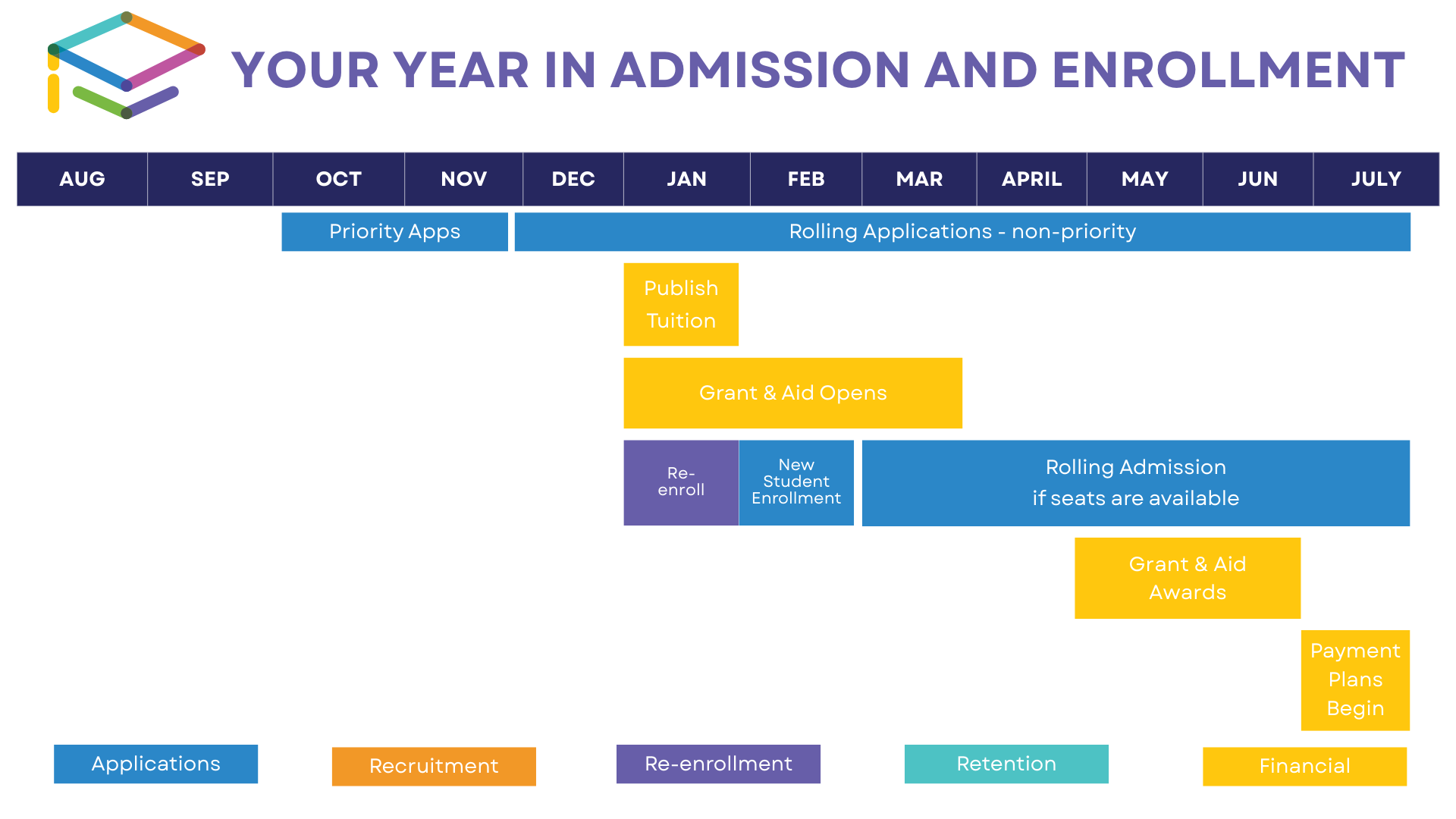
Aligning Your Efforts with the Enrollment Rhythm
To make the most of each phase, align your outreach with the admissions calendar. If you follow the suggested schedule above, with new student enrollment beginning in February, your primary recruiting window will occur in September through January. This is when you should intensify your marketing efforts by increasing social media campaigns, hosting open houses, and reaching out directly to prospective families.
While recruiting looks different for every school, here are some things you can do during this crucial period:
- Flood social media with images of joyful families and students, as well as student success stories.
- Notify current parents about priority consideration for sibling applications.
- Invite feeder schools for special tours and open houses.
- Incentivize prospects to apply by a certain date for priority consideration.
- Invite prospects to holiday events to show off your school’s culture and community.
- Host a financial aid Q&A.
No matter what recruitment techniques you employ, consistency and timing are key to keeping your school top of mind. It’s also important to not forget your re-enrollment efforts, which should be happening in the same window.
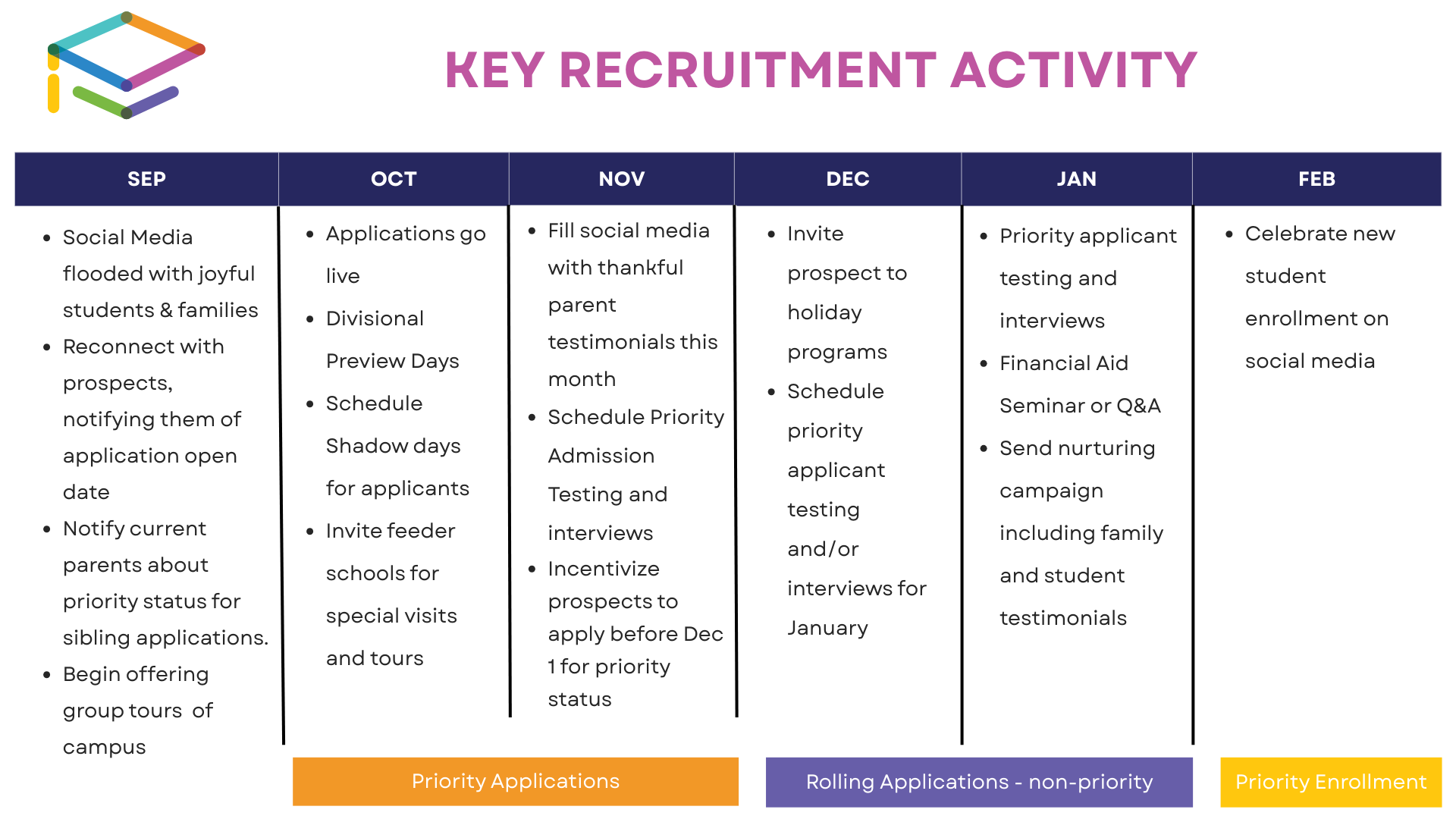
Let FACTS Help You Streamline the Process
With FACTS’ integrated admissions and enrollment tool, your school can track every step of the process, engage families more effectively, and simplify workflows from August to July. It’s not just about staying organized—it’s about staying ahead.
Ready to streamline your admissions process? Learn more about our admissions tool today!
